AionUi:免费开源桌面应用,将Gemini CLI AI聊天体验图形化
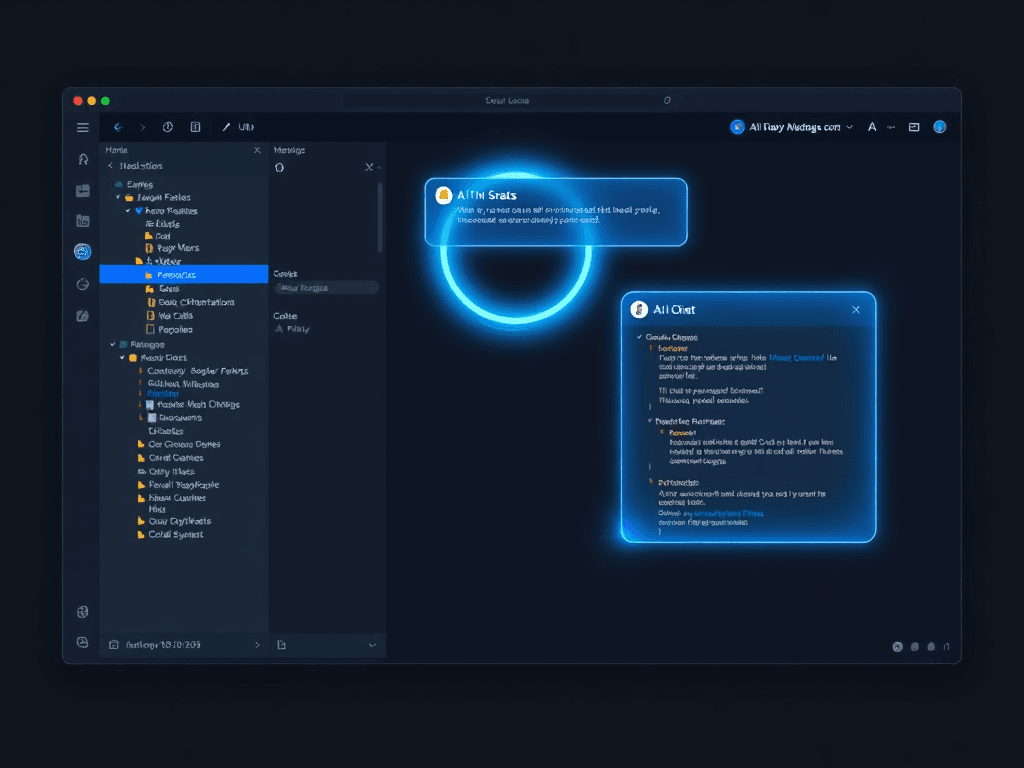
AionUi is a free, open-source, cross-platform desktop application built on Electron and React that transforms the Gemini CLI command-line AI chat experience into a modern, efficient graphical interface. It enhances chat functionality with multi-session management, local persistent history, and natural chat interactions, while offering robust file and project management capabilities including visual file trees, file uploads, and code comparison views. The tool integrates full Gemini API functionality, supports rich-text Markdown rendering, and optimizes developer workflows. (AionUi是一款基于Electron和React构建的免费、开源、跨平台桌面应用,将Gemini CLI命令行AI聊天体验转化为现代化、高效的图形界面。它通过多会话管理、本地持久化历史记录和自然聊天交互增强聊天功能,同时提供可视化文件树、文件上传和代码对比视图等强大的文件与项目管理能力。该工具集成完整的Gemini API功能,支持富文本Markdown渲染,优化开发者工作流程。)
In the rapidly evolving landscape of AI-assisted development, the power of large language models (LLMs) is often accessed through command-line interfaces (CLIs) or web-based playgrounds. While CLIs offer precision and scriptability, they can lack the intuitive, visual, and interactive experience that boosts productivity in complex workflows. AionUi emerges as a bridge between raw AI power and user-friendly interaction. It is a free, open-source, cross-platform desktop application that transforms the command-line AI chat experience of Gemini CLIA command-line interface for Google's Gemini AI model, providing code generation and technical support. into a modern, efficient, and feature-rich graphical interface. By leveraging Electron一个使用Web技术(HTML、CSS、JavaScript)构建跨平台桌面应用程序的开源框架。 and ReactA JavaScript library for building user interfaces, particularly single-page applications., AionUi provides developers and technical users with enhanced chat capabilities, robust file management, and seamless integration of Gemini's API, all within a cohesive and visually appealing desktop environment.
在人工智能辅助开发快速发展的领域中,大型语言模型(LLM)的强大能力通常通过命令行界面(CLI)或基于网络的交互平台来访问。虽然CLI提供了精确性和可编写脚本的能力,但它们往往缺乏在复杂工作流程中能提升生产力的直观、可视化和交互式体验。AionUi应运而生,成为原始AI能力与用户友好交互之间的桥梁。它是一个免费、开源、跨平台的桌面应用程序,将Gemini CLIA command-line interface for Google's Gemini AI model, providing code generation and technical support.的命令行AI聊天体验转化为现代化、高效且功能丰富的图形界面。通过利用Electron一个使用Web技术(HTML、CSS、JavaScript)构建跨平台桌面应用程序的开源框架。和ReactA JavaScript library for building user interfaces, particularly single-page applications.,AionUi为开发者和技术用户提供了增强的聊天功能、强大的文件管理能力以及Gemini API的无缝集成,所有这些都集中在一个连贯且视觉吸引人的桌面环境中。
核心功能概览 | Core Feature Overview
AionUi is designed with a focus on enhancing the practical utility of AI chat for technical work. Its features are categorized into three main pillars: an enhanced chat experience, comprehensive file and project management, and developer-centric workflow optimization.
AionUi的设计专注于提升AI聊天在技术工作中的实际效用。其功能主要围绕三大支柱:增强的聊天体验、全面的文件和项目管理,以及以开发者为中心的工作流优化。
增强的聊天体验 | Enhanced Chat Experience
- 多会话管理允许用户同时创建和管理多个独立的聊天会话,便于并行处理不同任务或主题。: Effortlessly create, switch between, and manage multiple concurrent chat sessions. This allows users to separate discussions on different topics, projects, or lines of inquiry without losing context.
多会话管理允许用户同时创建和管理多个独立的聊天会话,便于并行处理不同任务或主题。:轻松创建、切换和管理多个并发的聊天会话。这使用户能够将不同主题、项目或研究方向的讨论分开进行,而不会丢失上下文。 - 本地持久化历史记录将聊天历史记录存储在用户本地设备中,确保数据持久保存且可离线访问。: All conversation history is stored locally on your machine. This ensures privacy, enables offline review of past interactions, and provides a persistent memory of your AI-assisted work.
本地持久化历史记录将聊天历史记录存储在用户本地设备中,确保数据持久保存且可离线访问。:所有的对话历史都存储在您的本地机器上。这确保了隐私性,支持离线查看过去的交互,并为您的AI辅助工作提供了持久的记忆。 - 现代化自然交互界面: Moving beyond the plain text of a terminal, AionUi offers a polished, responsive chat interface that supports natural conversation flow, making interactions with the AI model feel more intuitive and engaging.
现代化自然交互界面:超越了终端的纯文本界面,AionUi提供了一个精致、响应迅速的聊天界面,支持自然的对话流程,使得与AI模型的交互感觉更加直观和吸引人。
文件与项目管理 | File & Project Management
- 可视化文件树以树状结构图形化展示文件和目录层次,便于用户直观浏览和管理项目文件。: Navigate your project directories with a familiar, explorer-like tree view directly within the application. This provides immediate context for file-related queries and operations.
可视化文件树以树状结构图形化展示文件和目录层次,便于用户直观浏览和管理项目文件。:直接在应用程序内使用熟悉的、类似资源管理器的树状视图来浏览您的项目目录。这为与文件相关的查询和操作提供了即时上下文。 - 便捷文件上传: Drag-and-drop or select files to upload them directly into the chat context. This is invaluable for asking the AI to analyze code, review documents, or process data contained in files.
便捷文件上传:通过拖放或选择文件,将其直接上传到聊天上下文中。这对于要求AI分析代码、审阅文档或处理文件中包含的数据来说非常宝贵。 - 集成代码对比视图并排显示代码差异的功能,常用于代码审查、版本比较和变更分析。: When discussing code changes or improvements, AionUi can integrate diff views to visually compare code snippets, making it easier to understand suggested modifications.
集成代码对比视图并排显示代码差异的功能,常用于代码审查、版本比较和变更分析。:在讨论代码变更或改进时,AionUi可以集成代码对比视图并排显示代码差异的功能,常用于代码审查、版本比较和变更分析。,以可视化方式比较代码片段,从而更容易理解建议的修改。
开发者工作流优化 | Developer Workflow Optimization
- 完整的Gemini API集成: AionUi provides full access to the capabilities of the Gemini API, acting as a powerful graphical client. Users can configure their API keys with a simple setup process.
完整的Gemini API集成:AionUi提供了对Gemini API功能的完全访问权限,充当一个强大的图形客户端。用户可以通过简单的设置过程配置其API密钥。 - 富文本Markdown渲染将Markdown标记语言实时渲染为格式化的富文本内容,支持表格、代码块、列表等复杂元素。: AI responses containing Markdown formatting, code blocks, lists, and tables are rendered beautifully, improving readability and presentation of technical content.
富文本Markdown渲染将Markdown标记语言实时渲染为格式化的富文本内容,支持表格、代码块、列表等复杂元素。:包含Markdown格式、代码块、列表和表格的AI响应会被精美地渲染出来,提高了技术内容的可读性和呈现效果。 - 简化配置: The tool abstracts away complex CLI commands and configurations, allowing users to focus on their tasks rather than on remembering command syntax or managing scripts.
简化配置:该工具抽象了复杂的CLI命令和配置,使用户能够专注于他们的任务,而不是记忆命令语法或管理脚本。
技术架构解析 | Technical Architecture Analysis
AionUi's robust feature set is built upon a carefully chosen modern technology stack, ensuring performance, maintainability, and a high-quality user experience.
AionUi强大的功能集建立在一个精心挑选的现代技术栈之上,确保了性能、可维护性和高质量的用户体验。
桌面应用框架:Electron一个使用Web技术(HTML、CSS、JavaScript)构建跨平台桌面应用程序的开源框架。 | Desktop Framework: Electron一个使用Web技术(HTML、CSS、JavaScript)构建跨平台桌面应用程序的开源框架。
The application is built using Electron一个使用Web技术(HTML、CSS、JavaScript)构建跨平台桌面应用程序的开源框架。, which allows for the development of cross-platform desktop applications using web technologies (HTML, CSS, and JavaScript). This enables AionUi to run seamlessly on Windows, macOS, and Linux from a single codebase, while providing native desktop application capabilities like system tray integration and native menus.
该应用程序使用 Electron一个使用Web技术(HTML、CSS、JavaScript)构建跨平台桌面应用程序的开源框架。 构建,它允许使用Web技术(HTML、CSS和JavaScript)开发跨平台桌面应用程序。这使得AionUi能够在Windows、macOS和Linux上从一个代码库无缝运行,同时提供诸如系统托盘集成和原生菜单等原生桌面应用程序功能。
前端框架:ReactA JavaScript library for building user interfaces, particularly single-page applications. | Frontend Framework: ReactA JavaScript library for building user interfaces, particularly single-page applications.
The user interface is constructed with ReactA JavaScript library for building user interfaces, particularly single-page applications., a declarative and efficient JavaScript library for building user interfaces. ReactA JavaScript library for building user interfaces, particularly single-page applications.'s component-based model facilitates the creation of a complex, dynamic, and responsive UI, allowing for efficient updates and rendering as the user interacts with chats and files.
用户界面使用 ReactA JavaScript library for building user interfaces, particularly single-page applications. 构建,这是一个用于构建用户界面的声明式且高效的JavaScript库。ReactA JavaScript library for building user interfaces, particularly single-page applications.基于组件的模型促进了复杂、动态和响应式UI的创建,允许在用户与聊天和文件交互时进行高效的更新和渲染。
UI组件库:Arco Design | UI Component Library: Arco Design
For a consistent, professional, and modern look and feel, AionUi utilizes the Arco Design Web React基于React的企业级UI组件库,提供丰富的预制组件用于构建现代化用户界面。 component library. This provides a comprehensive set of pre-built, accessible, and customizable UI components (buttons, modals, trees, etc.), accelerating development and ensuring interface consistency.
为了获得一致、专业和现代的外观与感觉,AionUi使用了 Arco Design Web React基于React的企业级UI组件库,提供丰富的预制组件用于构建现代化用户界面。 组件库。这提供了一套全面的预构建、可访问且可定制的UI组件(按钮、模态框、树形控件等),加速了开发并确保了界面的一致性。
AI引擎:Gemini CLIA command-line interface for Google's Gemini AI model, providing code generation and technical support. Core | AI Engine: Gemini CLIA command-line interface for Google's Gemini AI model, providing code generation and technical support. Core
At its core, AionUi integrates Google Gemini CLIA command-line interface for Google's Gemini AI model, providing code generation and technical support. Core as its AI processing engine. This integration is key to its functionality, providing the powerful language understanding, generation, and reasoning capabilities that power the chat and analysis features within the graphical shell.
其核心在于集成了 Google Gemini CLIA command-line interface for Google's Gemini AI model, providing code generation and technical support. Core 作为其AI处理引擎。这一集成是其功能的关键,提供了强大的语言理解、生成和推理能力,为图形外壳内的聊天和分析功能提供动力。
样式框架:UnoCSS原子化CSS框架,通过按需生成样式来高效管理应用程序的样式系统。 | Styling Framework: UnoCSS原子化CSS框架,通过按需生成样式来高效管理应用程序的样式系统。
Styling is managed through UnoCSS原子化CSS框架,通过按需生成样式来高效管理应用程序的样式系统。, an atomic CSS engine. UnoCSS原子化CSS框架,通过按需生成样式来高效管理应用程序的样式系统。 promotes highly efficient and maintainable styling by generating utility-based CSS on-demand. This results in smaller bundle sizes and provides a flexible, functional approach to styling the application's interface.
样式通过 UnoCSS原子化CSS框架,通过按需生成样式来高效管理应用程序的样式系统。 管理,这是一个原子化CSS引擎。UnoCSS原子化CSS框架,通过按需生成样式来高效管理应用程序的样式系统。通过按需生成基于实用程序的CSS,促进了高效且可维护的样式设计。这导致了更小的打包体积,并为应用程序界面的样式设计提供了一种灵活、实用的方法。
应用场景与价值 | Application Scenarios & Value
AionUi is not just a chat interface; it's a versatile desktop companion designed to augment various technical and creative workflows.
AionUi不仅仅是一个聊天界面;它是一个多功能的桌面伴侣,旨在增强各种技术和创意工作流程。
- 代码开发: Assist with code review, provide optimization and refactoring suggestions, help debug errors, and explain complex code blocks. The file tree and upload features make it easy to provide context.
代码开发:协助代码审查,提供优化和重构建议,帮助调试错误,并解释复杂的代码块。文件树和上传功能使得提供上下文变得容易。 - 文档写作: Automate the generation of documentation, draft reports, summarize lengthy articles, and format content. The integrated Markdown rendering ensures the output is immediately presentable.
文档写作:自动化生成文档、起草报告、总结长篇文章以及格式化内容。集成的Markdown渲染确保输出内容立即可呈现。 - 数据分析: Upload data files (CSV, JSON) and ask the AI to help with interpretation, suggest visualizations, or generate summary reports, acting as an analytical assistant.
数据分析:上传数据文件(CSV、JSON),并请求AI帮助解释、建议可视化方案或生成总结报告,充当分析助手。 - 项目管理: Brainstorm project plans, break down tasks, generate status update templates, and manage project-related Q&A, all within a dedicated chat session.
项目管理:在专用的聊天会话中进行项目计划头脑风暴、分解任务、生成状态更新模板以及管理项目相关的问答。 - 学习辅助: Use it as a knowledge partner to explain new concepts, answer technical questions, or provide learning resource recommendations across various domains.
学习辅助:将其用作知识伙伴,解释新概念、回答技术问题或提供跨领域的学习资源推荐。
获取与开始使用 | Getting Started
AionUi is freely available and open for community contribution. You can find the source code, pre-built installers for different operating systems, and detailed documentation on its official GitHub repository.
AionUi是免费提供的,并开放给社区贡献。您可以在其官方GitHub仓库中找到源代码、针对不同操作系统的预构建安装程序以及详细文档。
项目GitHub地址: https://github.com/office-sec/AionUi
By packaging the formidable capabilities of the Gemini CLIA command-line interface for Google's Gemini AI model, providing code generation and technical support. into an accessible and powerful desktop GUI, AionUi significantly lowers the barrier to effectively leveraging AI for daily technical tasks. It represents a practical step towards more integrated and intuitive AI-powered tools for developers and knowledge workers.
通过将Gemini CLIA command-line interface for Google's Gemini AI model, providing code generation and technical support.的强大能力封装到一个易于访问且功能强大的桌面GUI中,AionUi显著降低了在日常技术任务中有效利用AI的门槛。它代表了为开发者和知识工作者迈向更集成、更直观的AI驱动工具的一个实用步骤。
版权与免责声明:本文仅用于信息分享与交流,不构成任何形式的法律、投资、医疗或其他专业建议,也不构成对任何结果的承诺或保证。
文中提及的商标、品牌、Logo、产品名称及相关图片/素材,其权利归各自合法权利人所有。本站内容可能基于公开资料整理,亦可能使用 AI 辅助生成或润色;我们尽力确保准确与合规,但不保证完整性、时效性与适用性,请读者自行甄别并以官方信息为准。
若本文内容或素材涉嫌侵权、隐私不当或存在错误,请相关权利人/当事人联系本站,我们将及时核实并采取删除、修正或下架等处理措施。 也请勿在评论或联系信息中提交身份证号、手机号、住址等个人敏感信息。