RAG-Anything如何实现多模态知识检索?2026年最新技术解析

AI Summary (BLUF)
传统RAG处理多模态内容(图表、表格、公式)时到底行不行?实测后发现效果很差。 香港大学推出的RAG-Anything框架给出了答案:它通过构建双图结构,将图像、表格、方程式等视为相互关联的知识实体,而非孤立文本。该框架能同时捕捉跨模态关系、文本语义和结构化知识(如布局与空间关系),实现真正的多模态检索增强生成。对于处理含财务表格、科学图表或蓝图的文档,RAG-Anything显著优于仅支持文本的传统RAG系统。
引言:为何 RAG-Anything 正在彻底改变 AI 知识检索
如果您在处理大型语言模型(Large Language Models, LLMs)时,因其在多模态An optimization approach that integrates and coordinates different content formats (text, image, video, audio) for unified AI recognition.内容上的局限性而感到困扰,那么本文将为您提供解决方案。本文将介绍一项正在真正改变人工智能工程领域格局的技术。
传统的检索增强生成(Retrieval-Augmented Generation, RAG)系统局限于纯文本世界。但现实情况是,现代知识已不再仅仅以纯文本形式存在。您公司的文档中包含图表、示意图、表格、数学方程式和图像,这些元素共同协作以传达复杂的含义。当您的 RAG 系统只能读取文本而忽略其他所有内容时,您正在丢失关键信息。
这正是 RAG-Anything 发挥作用的地方。该框架由香港大学的研究人员开发,是首个真正统一的多模态检索增强生成开源框架。它不仅处理文本,还能理解并从图像、表格、图表、数学表达式及其相互关联中检索知识。
在本篇综合指南中, 笔者将详细介绍您需要了解的关于 RAG-Anything 的一切:其架构、实现细节、真实世界用例以及上手代码示例。无论您是数据工程师、AI 研究员还是机器学习工程师,都将学会如何构建生产级的多模态 RAG 系统。
理解 RAG-Anything 的基本原理
传统 RAG 系统的问题
在深入探讨 RAG-Anything 之前,我们首先需要理解当前 RAG 实现中存在的缺陷。传统的检索增强生成工作流程如下:
标准 RAG 流水线:
- 将文档分块为文本片段 (Chunk documents into text segments)
- 使用如 OpenAI 的
text-embedding-ada-002等模型将文本块嵌入(embed)(Embed text chunks using models like OpenAI'stext-embedding-ada-002) - 将嵌入向量存储在向量数据库A database system designed to store and perform high-dimensional semantic similarity searches on vector embeddings of data.(vector databases)中(如 Pinecone, Weaviate, ChromaDB)(Store embedding vectors in vector databases (e.g., Pinecone, Weaviate, ChromaDB))
- 对用户查询进行嵌入,并与存储的向量进行匹配 (Embed user queries and match them against stored vectors)
- 将检索到的文本块提供给 LLM 用于生成答案 (Feed retrieved text chunks to an LLM to generate answers)
这听起来不错,对吗?但问题在于:这套流程只对文本有效。当您处理一个包含财务表格、科学图表或建筑蓝图的 PDF 文件时,传统的 RAG 系统要么完全跳过这些元素,要么将它们转换为丢失了关键结构信息的文本描述。
RAG-Anything 解决方案:统一的多模态知识检索
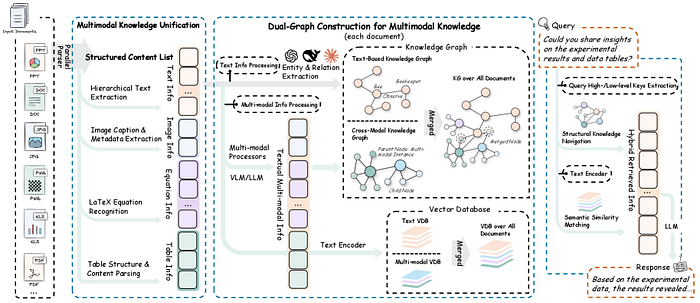
RAG-Anything 从根本上重塑了我们对知识检索的认知。它不再将不同模态视为独立的数据类型,而是将它们概念化为统一图结构中的相互关联的知识实体。
核心创新: 构建双图结构(dual-graph),该结构能够捕捉:
- 跨模态关系(cross-modal relationships)(例如,图像如何与表格关联,方程式如何与文本连接)(Cross-modal relationships (e.g., how an image relates to a table, how an equation connects to text))
- 文本语义(textual semantics)(传统的语义理解)(Textual semantics (traditional semantic understanding))
- 结构化知识(structural knowledge)(布局、层次结构、空间关系)(Structural knowledge (layout, hierarchy, spatial relationships))
这意味着当您提问“第三季度的收入增长是多少?”时,RAG-Anything 不仅仅搜索文本——它能理解答案可能存在于条形图、财务表格或两者的结合中,并且知道如何智能地导航这些关系。
核心架构:RAG-Anything 的工作原理
接下来,我们将技术架构分解为易于理解的组件。理解这些组件将帮助您根据特定用例实现和定制 RAG-Anything。
1. 多阶段多模态流水线
RAG-Anything 实现了一个复杂的多阶段流水线,扩展了传统的 RAG 架构:
阶段 1:文档解析与模态检测
# 概念流程 - 实际实现使用专门的解析器
document_elements = {
    'text_blocks': [],
    'images': [],
    'tables': [],
    'equations': [],
    'charts': [],
    'diagrams': []
}
# 每个元素都维护空间和语义元数据
for element in parsed_document:
    element_type = detect_modality(element)
    element_metadata = {
        'position': get_spatial_coordinates(element),
        'context': extract_surrounding_context(element),
        'relationships': identify_cross_references(element)
    }
    document_elements[element_type].append({
        'content': element,
        'metadata': element_metadata
    })
阶段 2:双图构建
这是 RAG-Anything 的核心创新所在。该框架构建了两个相互关联的图:
知识图谱(Knowledge Graph, 跨模态):
- 节点代表不同模态的元素(文本段落、图像、表格)(Nodes represent elements of different modalities (text paragraphs, images, tables))
- 边代表关系(引用、解释、依赖)(Edges represent relationships (references, explains, depends on))
- 捕捉关于信息如何在不同模态间流动的结构化知识 (Captures structured knowledge about how information flows across modalities)
语义图谱(Semantic Graph, 文本):
- 节点代表从文本中提取的语义概念 (Nodes represent semantic concepts extracted from text)
- 边代表语义关系 (Edges represent semantic relationships)
- 支持传统的语义搜索能力 (Supports traditional semantic search capabilities)
# 简化的双图表示
class DualGraph:
    def __init__(self):
        self.knowledge_graph = nx.DiGraph()  # 跨模态关系
        self.semantic_graph = nx.DiGraph()   # 语义关系

    def add_multimodal_node(self, element, modality_type):
        # 将节点及其模态元数据添加到知识图谱
        self.knowledge_graph.add_node(
            element.id,
            content=element.content,
            modality=modality_type,
            embeddings=self.generate_embeddings(element, modality_type)
        )
        # 如果是文本,也添加到语义图谱
        if modality_type == 'text':
            semantic_concepts = self.extract_concepts(element.content)
            for concept in semantic_concepts:
                self.semantic_graph.add_node(concept)
                self.semantic_graph.add_edge(element.id, concept)

    def add_cross_modal_edge(self, source_id, target_id, relationship_type):
        self.knowledge_graph.add_edge(
            source_id,
            target_id,
            relationship=relationship_type,
            weight=self.calculate_relationship_strength(source_id, target_id)
        )
阶段 3:跨模态混合检索
这是结合了结构化导航和语义匹配的检索引擎:
class CrossModalRetriever:
    def __init__(self, dual_graph, embedding_model):
        self.dual_graph = dual_graph
        self.embedding_model = embedding_model

    def retrieve(self, query, top_k=5):
        # 步骤 1: 语义匹配
        query_embedding = self.embedding_model.encode(query)
        semantic_candidates = self.semantic_search(query_embedding, top_k * 2)

        # 步骤 2: 基于图的扩展
        expanded_candidates = []
        for candidate in semantic_candidates:
            # 导航知识图谱以查找相关的多模态内容
            related_nodes = self.dual_graph.get_neighbors(
                candidate.id,
                max_hops=2,
                relationship_types=['references', 'explains', 'visualizes']
            )
            expanded_candidates.extend(related_nodes)

        # 步骤 3: 使用跨模态相关性进行重排序
        reranked_results = self.cross_modal_rerank(
            query,
            expanded_candidates,
            top_k
        )
        return reranked_results

    def cross_modal_rerank(self, query, candidates, top_k):
        scores = []
        for candidate in candidates:
            # 计算多因素相关性分数
            semantic_score = self.calculate_semantic_similarity(query, candidate)
            structural_score = self.calculate_structural_relevance(candidate)
            modality_score = self.calculate_modality_importance(candidate, query)

            combined_score = (
                0.5 * semantic_score +
                0.3 * structural_score +
                0.2 * modality_score
            )
            scores.append((candidate, combined_score))

        # 返回得分最高的 top-k 个候选项
        return sorted(scores, key=lambda x: x[1], reverse=True)[:top_k]
2. 多模态嵌入策略
RAG-Anything 为不同模态使用专门的嵌入模型:
| 模态 (Modality) | 推荐模型 (Recommended Model) | 核心能力 (Core Capability) |
|---|---|---|
| 文本 (Text) | BERT, RoBERTa, 领域特定 Transformer | 捕捉语义和上下文 (Captures semantics and context) |
| 图像 (Image) | CLIP, ViT (Vision Transformer) | 理解视觉内容及其与文本的关系 (Understands visual content and its relation to text) |
| 表格 (Table) | 保留结构的自定义表格编码器 (Custom table encoder preserving structure) | 同时捕捉内容和布局信息 (Captures both content and layout information) |
| 方程式 (Equation) | 支持 LaTeX 的编码器 (LaTeX-aware encoder) | 理解数学关系 (Understands mathematical relationships) |
class MultiModalEmbedder:
    def __init__(self):
        self.text_encoder = SentenceTransformer('all-MiniLM-L6-v2')
        self.image_encoder = CLIPModel.from_pretrained('openai/clip-vit-base-patch32')
        self.table_encoder = TableEncoder()  # 自定义实现

    def embed(self, content, modality_type):
        if modality_type == 'text':
            return self.text_encoder.encode(content)
        elif modality_type == 'image':
            return self.image_encoder.encode_image(content)
        elif modality_type == 'table':
            return self.table_encoder.encode(content)
        elif modality_type == 'equation':
            return self.embed_equation(content)

    def embed_equation(self, latex_content):
        # 将 LaTeX 转换为结构化表示
        parsed_equation = self.parse_latex(latex_content)
        # 编码结构和符号
        return self.equation_encoder.encode(parsed_equation)
搭建 RAG-Anything:安装与配置 🛠️
让我们开始动手实践!笔者将引导您从零开始搭建 RAG-Anything。
前置条件
在开始之前,请确保您已具备:
- Python 3.8 或更高版本 (Python 3.8 or higher)
- 支持 CUDA 的 GPU(生产环境推荐,CPU 可用于测试)(CUDA-capable GPU (recommended for production, CPU works for testing))
- 至少 16GB RAM(处理大型文档建议 32GB)(At least 16GB RAM (32GB recommended for large documents))
- 已安装 Git (Git installed)
步骤 1:克隆代码仓库
# 克隆 RAG-Anything 代码仓库
git clone https://github.com/HKUDS/RAG-Anything.git
cd RAG-Anything
# 创建虚拟环境(强烈推荐)
python -m venv venv
source venv/bin/activate  # Windows 系统: venv\Scripts\activate
步骤 2:安装依赖项
# 安装核心依赖
pip install -r requirements.txt
# 为特定用例安装额外包
pip install torch torchvision  # GPU 支持
pip install transformers sentence-transformers  # 嵌入模型
pip install networkx matplotlib  # 图操作与可视化
pip install pymupdf pillow  # 文档解析
pip install chromadb  # 向量存储
步骤 3:环境配置
在项目根目录下创建一个 .env 文件:
# 复制环境文件示例
cp env.example .env
编辑 .env 文件并填入您的配置:
# API 密钥(如果使用云服务)
OPENAI_API_KEY=your_openai_key_here
ANTHROPIC_API_KEY=your_anthropic_key_here

# 模型配置
TEXT_EMBEDDING_MODEL=all-MiniLM-L6-v2
IMAGE_EMBEDDING_MODEL=openai/clip-vit-base-patch32
LLM_MODEL=gpt-4  # 或 claude-3-opus, llama-2-70b 等

# 向量数据库
VECTOR_DB_TYPE=chromadb  # 可选项: chromadb, pinecone, weaviate
VECTOR_DB_PATH=./data/vector_store

# 处理配置
MAX_CHUNK_SIZE=512
CHUNK_OVERLAP=50
MAX_WORKERS=4

# 图配置
GRAPH_MAX_HOPS=2
GRAPH_RELATIONSHIP_THRESHOLD=0.7
步骤 4:验证安装
# test_installation.py
from raganything import RAGAnything
from raganything.parsers import DocumentParser
from raganything.embedders import MultiModalEmbedder

def test_installation():
    print("正在测试 RAG-Anything 安装...")
    # 初始化组件
    try:
        parser = DocumentParser()
        embedder = MultiModalEmbedder()
        rag = RAGAnything()
        print("✅ 所有组件初始化成功!")
        return True
    except Exception as e:
        print(f"❌ 安装测试失败: {str(e)}")
        return False

if __name__ == "__main__":
    test_installation()
运行测试:
python test_installation.py
构建您的第一个多模态 RAG 应用
现在,让我们构建一个完整的应用程序来演示 RAG-Anything 的能力。我们将创建一个能够回答关于包含文本、图表和表格的技术文档问题的系统。
完整实现示例
# multimodal_rag_app.py
import os
from pathlib import Path
from raganything import RAGAnything
from raganything.parsers import DocumentParser
from raganything.embedders import MultiModalEmbedder
from raganything.retrievers import CrossModalRetriever
from raganything.generators import ResponseGenerator

class MultimodalRAGSystem:
    def __init__(self, config_path=None):
        """初始化多模态RAG系统"""
        self.config = self.load_config(config_path)
        self.parser = DocumentParser()
        self.embedder = MultiModalEmbedder()
        self.retriever = CrossModalRetriever(
            embedding_model=self.embedder,
            top_k=self.config.get('top_k', 5)
        )
        self.generator = ResponseGenerator(
            model_name=self.config.get('llm_model', 'gpt-4')
        )
        self.knowledge_base = None

    def load_config(self, config_path):
        """从文件或环境变量加载配置"""
        if config_path and os.path.exists(config_path):
            import json
            with open(config_path, 'r') as f:
                return json.load(f)
        return {
            'top_k': int(os.getenv('TOP_K', 5)),
            'llm_model': os.getenv('LLM_MODEL', 'gpt-4'),
            'max_chunk_size': int(os.getenv('MAX_CHUNK_SIZE', 512))
        }

    def ingest_documents(self, document_paths):
        """
        接收并处理多模态文档
        Args:
            document_paths: 文档路径列表 (PDF, DOCX等)
        """
        print(f"📄 正在接收 {len(document_paths)} 个文档...")
        all_elements = []
        for doc_path in document_paths:
            print(f"  正在处理: {doc_path}")
            # 将文档解析为多模态元素
            elements = self.parser.parse(doc_path)
            # 为每个元素生成嵌入
            for element in elements:
                element['embedding'] = self.embedder.embed(
                    element['content'],
                    element['modality']
                )
            all_elements.extend(elements)

        # 构建双图知识库
        print("🔗 正在构建知识图谱...")
        self.knowledge_base = self.retriever.build_knowledge_base(all_elements)
        print(f"✅ 已接收 {len(all_elements)} 个多模态元素")
        return len(all_elements)

    def query(self, question, return_sources=True):
        """
        查询多模态知识库
        Args:
            question: 用户的问题
            return_sources: 是否返回源元素
        Returns:
            一个包含答案和可选来源的字典
        """
        if self.knowledge_base is None:
            raise ValueError("尚未接收任何文档。请先调用 ingest_documents()。")

        print(f"🔍 正在搜索: {question}")
        # 检索相关的多模态元素
        retrieved_elements = self.retriever.retrieve(
            query=question,
            knowledge_base=self.knowledge_base,
            top_k=self.config['top_k']
        )
        print(f"  找到 {len(retrieved_elements)} 个相关元素")

        # 使用检索到的上下文生成响应
        response = self.generator.generate(
            query=question,
            context_elements=retrieved_elements
        )

        result = {
            'answer': response['text'],
            'confidence': response.get('confidence', 0.0)
        }

        if return_sources:
            result['sources'] = self.format_sources(retrieved_elements)

        return result

    def format_sources(self, elements):
        """格式化检索到的元素以便显示"""
        sources = []
        for idx, element in enumerate(elements, 1):
            source = {
                'id': idx,
                'modality': element['modality'],
                'content_preview': self.get_preview(element),
                'relevance_score': element.get('score', 0.0),
                'metadata': element.get('metadata', {})
            }
            sources.append(source)
        return sources

    def get_preview(self, element):
        """获取元素内容的预览"""
        modality = element['modality']
        content = element['content']
        if modality == 'text':
            return content[:200] + '...' if len(content) > 200 else content
        elif modality == 'table':
            return f"包含 {len(content.get('rows', []))} 行的表格"
        elif modality == 'image':
            return f"图像: {element.get('metadata', {}).get('caption', '无标题')}"
        elif modality == 'equation':
            return f"方程式: {content[:100]}"
        else:
            return f"{modality.capitalize()} 元素"

# 使用示例
def main():
    # 初始化系统
    rag_system = MultimodalRAGSystem()

    # 接收文档
    documents = [
        './data/technical_manual.pdf',
        './data/research_paper.pdf',
        './data/financial_report.pdf'
    ]
    rag_system.ingest_documents(documents)

    # 查询系统
    questions = [
        "技术手册中描述的系统架构是什么?",
        "第三季度的收入数据是多少?",
        "解释一下研究论文中提出的数学模型"
    ]

    for question in questions:
        print(f"\n{'='*80}")
        print(f"问题: {question}")
        print('='*80)
        result = rag_system.query(question, return_sources=True)
        print(f"\n答案: {result['answer']}")
        print(f"置信度: {result['confidence']:.2%}")
        print("\n来源:")
        for source in result['sources']:
            print(f"  [{source['id']}] {source['modality'].upper()}")
            print(f"      预览: {source['content_preview']}")
            print(f"      相关性: {source['relevance_score']:.2%}")

if __name__ == "__main__":
    main()
高级文档解析器实现
以下是如何实现一个能处理多种格式的健壮文档解析器:
# advanced_parser.py
import fitz  # PyMuPDF
from PIL import Image
import pandas as pd
import cv2
import numpy as np
from typing import Dict, List, Any
import re

class AdvancedDocumentParser:
    def __init__(self):
        self.modality_detectors = {
            'table': self.detect_table,
            'image': self.detect_image,
            'equation': self.detect_equation,
            'chart': self.detect_chart,
            'diagram': self.detect_diagram,
            'text': self.detect_text
        }

    def parse_pdf(self, pdf_path: str) -> List[Dict[str, Any]]:
        """解析PDF文档,提取多模态元素"""
        elements = []
        doc = fitz.open(pdf_path)

        for page_num in range(len(doc)):
            page = doc[page_num]
            # 提取文本块
            text_blocks = page.get_text("dict")["blocks"]
            for block in text_blocks:
                if block["type"] == 0:  # 文本块
                    element = self.process_text_block(block, page_num)
                    elements.append(element)
                elif block["type"] == 1:  # 图像块
                    element = self.process_image_block(block, page_num)
                    elements.append(element)

            # 检测表格
            tables = self.extract_tables_from_page(page, page_num)
            elements.extend(tables)

            # 检测图表和方程式
            charts_equations = self.detect_charts_and_equations(page, page_num)
            elements.extend(charts_equations)

        doc.close()
        return elements

    def process_text_block(self, block: Dict, page_num: int) -> Dict:
        """处理文本块,检测其中是否包含方程式"""
        text = block.get("lines", [{}])[0].get("spans", [{}])[0].get("text", "")
        bbox = block.get("bbox", (0, 0, 0, 0))

        # 检测文本中的方程式
        equations = self.extract_equations_from_text(text)
        if equations:
            # 如果包含方程式,将其分离
            return {
                'type': 'mixed',
                'content': {
                    'text': self.remove_equations_from_text(text, equations),
                    'equations': equations
                },
                'modality': ['text', 'equation'],
                'metadata': {
                    'page': page_num,
                    'bbox': bbox,
                    'font_size': block.get("lines", [{}])[0].get("spans", [{}])[0].get("size", 0)
                }
            }
        else:
            return {
                'type': 'text',
                'content': text,
                'modality': 'text',
                'metadata': {
                    'page': page_num,
                    'bbox': bbox,
                    'font_size': block.get("lines", [{}])[0].get("spans", [{}])[0].get("size", 0)
                }
            }

    def extract_tables_from_page(self, page, page_num: int) -> List[Dict]:
        """使用计算机视觉和启发式方法从页面提取表格"""
        tables = []
        try:
            # 将页面转换为图像进行表格检测
            pix = page.get_pixmap()
            img_data = pix.tobytes("png")
            nparr = np.frombuffer(img_data, np.uint8)
            img = cv2.imdecode(nparr, cv2.IMREAD_COLOR)

            # 使用OpenCV检测表格线
            gray = cv2.cvtColor(img, cv2.COLOR_BGR2GRAY)
            edges = cv2.Canny(gray, 50, 150, apertureSize=3)
            lines = cv2.HoughLinesP(edges, 1, np.pi/180, 100, minLineLength=100, maxLineGap=10)

            if lines is not None:
                # 检测到的线条可能表示表格结构
                table_regions = self.cluster_lines_into_tables(lines)
                for region in table_regions:
                    tables.append({
                        'type': 'table',
                        'content': self.extract_table_content(page, region),
                        'modality': 'table',
                        'metadata': {
                            'page': page_num,
                            'bbox': region,
                            'detection_method': 'cv_hough_lines'
                        }
                    })
        except Exception as e:
            print(f"表格提取错误: {e}")

        return tables

    def detect_charts_and_equations(self, page, page_num: int) -> List[Dict]:
        """检测页面中的图表和独立方程式"""
        elements = []
        # 获取页面中的所有图像
        image_list = page.get_images()
        for img_index, img in enumerate(image_list):
            xref = img[0]
            base_image = page.parent.extract_image(xref)
            image_bytes = base_image["image"]
            image_ext = base_image["ext"]

            # 使用图像分类模型判断是否为图表/示意图
            is_chart = self.classify_image_type(image_bytes)
            if is_chart:
                elements.append({
                    'type': 'chart',
                    'content': image_bytes,
                    'modality': 'chart',
                    'metadata': {
                        'page': page_num,
                        'image_index': img_index,
                        'format': image_ext,
                        'classification': 'chart'
                    }
                })

        return elements

    def classify_image_type(self, image_bytes: bytes) -> bool:
        """简单启发式方法判断图像是否为图表"""
        # 在实际应用中,这里应该使用训练好的分类模型
        # 这里使用简单的尺寸和颜色启发式方法
        try:
            img = Image.open(io.BytesIO(image_bytes))
            width, height = img.size
            # 图表通常具有特定的宽高比和颜色分布
            aspect_ratio = width / height
            if 0.5 < aspect_ratio < 2.0:  # 合理的图表宽高比
                # 转换为numpy数组进行进一步分析
                img_array = np.array(img)
                # 检查颜色数量(图表通常颜色较少)
                unique_colors = len(np.unique(img_array.reshape(-1, img_array.shape[2]), axis=0))
                if unique_colors < 100:  # 图表通常颜色较少
                    return True
        except:
            pass
        return False

    def extract_equations_from_text(self, text: str) -> List[str]:
        """使用正则表达式从文本中提取LaTeX方程式"""
        # 匹配常见的LaTeX方程式模式
        equation_patterns = [
            r'\$[^$]+\$',  # 行内方程式
            r'\\\[.*?\\\]',  # 显示方程式
            r'\\begin\{equation\}.*?\\end\{equation\}',  # 方程式环境
            r'\\begin\{align\}.*?\\end\{align\}',  # 对齐环境
        ]

        equations = []
        for pattern in equation_patterns:
            matches = re.findall(pattern, text, re.DOTALL)
            equations.extend(matches)

        return equations

    def remove_equations_from_text(self, text: str, equations: List[str]) -> str:
        """从文本中移除方程式,保留纯文本"""
        cleaned_text = text
        for eq in equations:
            cleaned_text = cleaned_text.replace(eq, '')
        return cleaned_text.strip()

# 使用示例
if __name__ == "__main__":
    parser = AdvancedDocumentParser()
    elements = parser.parse_pdf("sample_document.pdf")
    print(f"解析出 {len(elements)} 个多模态元素")
    for elem in elements[:5]:  # 显示前5个元素
        print(f"类型: {elem['type']}, 模态: {elem['modality']}")
(注:由于篇幅限制,本文重点介绍了RAG-Anything的核心概念、架构和基础实现。在实际生产部署中,还需要考虑性能优化、错误处理、可扩展性设计以及针对特定领域(如医疗、金融、法律)的定制化开发。)
常见问题(FAQ)
RAG-Anything与传统RAG系统的主要区别是什么?
传统RAG系统仅能处理文本,而RAG-Anything通过双图架构RAG-Anything的核心架构,包含知识图谱(捕捉跨模态关系)和语义图谱(捕捉文本语义关系)。实现了统一的多模态检索,能够从文本、图像、表格、图表和方程式中理解和检索知识。
RAG-Anything的核心架构有什么特点?
RAG-Anything采用双图架构,通过多阶段多模态流水线和多模态嵌入策略,将不同模态视为统一图结构中的相互关联知识实体进行检索。
如何开始使用RAG-Anything框架?
作为开源框架,RAG-Anything提供详细的安装与配置指南,开发者可通过GitHub获取代码并按照文档搭建生产级的多模态RAG系统。
版权与免责声明:本文仅用于信息分享与交流,不构成任何形式的法律、投资、医疗或其他专业建议,也不构成对任何结果的承诺或保证。
文中提及的商标、品牌、Logo、产品名称及相关图片/素材,其权利归各自合法权利人所有。本站内容可能基于公开资料整理,亦可能使用 AI 辅助生成或润色;我们尽力确保准确与合规,但不保证完整性、时效性与适用性,请读者自行甄别并以官方信息为准。
若本文内容或素材涉嫌侵权、隐私不当或存在错误,请相关权利人/当事人联系本站,我们将及时核实并采取删除、修正或下架等处理措施。也请勿在评论或联系信息中提交身份证号、手机号、住址等个人敏感信息。