OpenAI Agents SDK 和 LangChain 哪个更适合构建多智能体工作流?

AI Summary (BLUF)
The OpenAI Agents SDK is a lightweight, provider-agnostic Python framework for building multi-agent workflows with features like sandbox agents, tools, guardrails, and real-time voice support.
原文翻译: OpenAI Agents SDK 是一个轻量级、提供商无关的 Python 框架,用于构建具有沙盒代理、工具、护栏和实时语音支持等功能的多智能体工作流。
The OpenAI Agents SDK is a lightweight yet powerful framework designed for building sophisticated multi-agent workflows. It stands out for being provider-agnostic, offering native support for the OpenAI Responses and Chat Completions APIs, as well as compatibility with over 100 other large language models (LLMs).
OpenAI Agents SDK 是一个专为构建复杂多智能体工作流而设计的轻量级且功能强大的框架。其突出特点是提供商无关性,原生支持 OpenAI Responses 和 Chat Completions API,同时兼容超过 100 种其他大型语言模型。
[!NOTE]
寻找 JavaScript/TypeScript 版本?请查看 Agents SDK JS/TS。
核心概念
1. 智能体 (Agents)
LLMs configured with instructions, tools, guardrails, and handoffs.
配置了指令、工具、护栏和交接机制的大型语言模型。
2. 沙盒智能体 (Sandbox Agents)
Agents preconfigured to work with a container to perform work over long time horizons.
预配置为在容器环境中工作,以执行长时间任务的智能体。
3. 智能体即工具 / 任务交接 (Agents as Tools / Handoffs)
Delegating to other agents for specific tasks.
将特定任务委托给其他智能体。
4. 工具 (Tools)
Various Tools let agents take actions (functions, MCP, hosted tools).
多种工具使智能体能够执行操作(函数、MCP、托管工具)。
5. 护栏 (Guardrails)
Configurable safety checks for input and output validation.
用于输入和输出验证的可配置安全检查。
6. 人在回路 (Human in the loop)
Built-in mechanisms for involving humans across agent runs.
在智能体运行过程中引入人工干预的内置机制。
7. 会话 (Sessions)
Automatic conversation history management across agent runs.
跨智能体运行的自动对话历史管理。
8. 追踪 (Tracing)
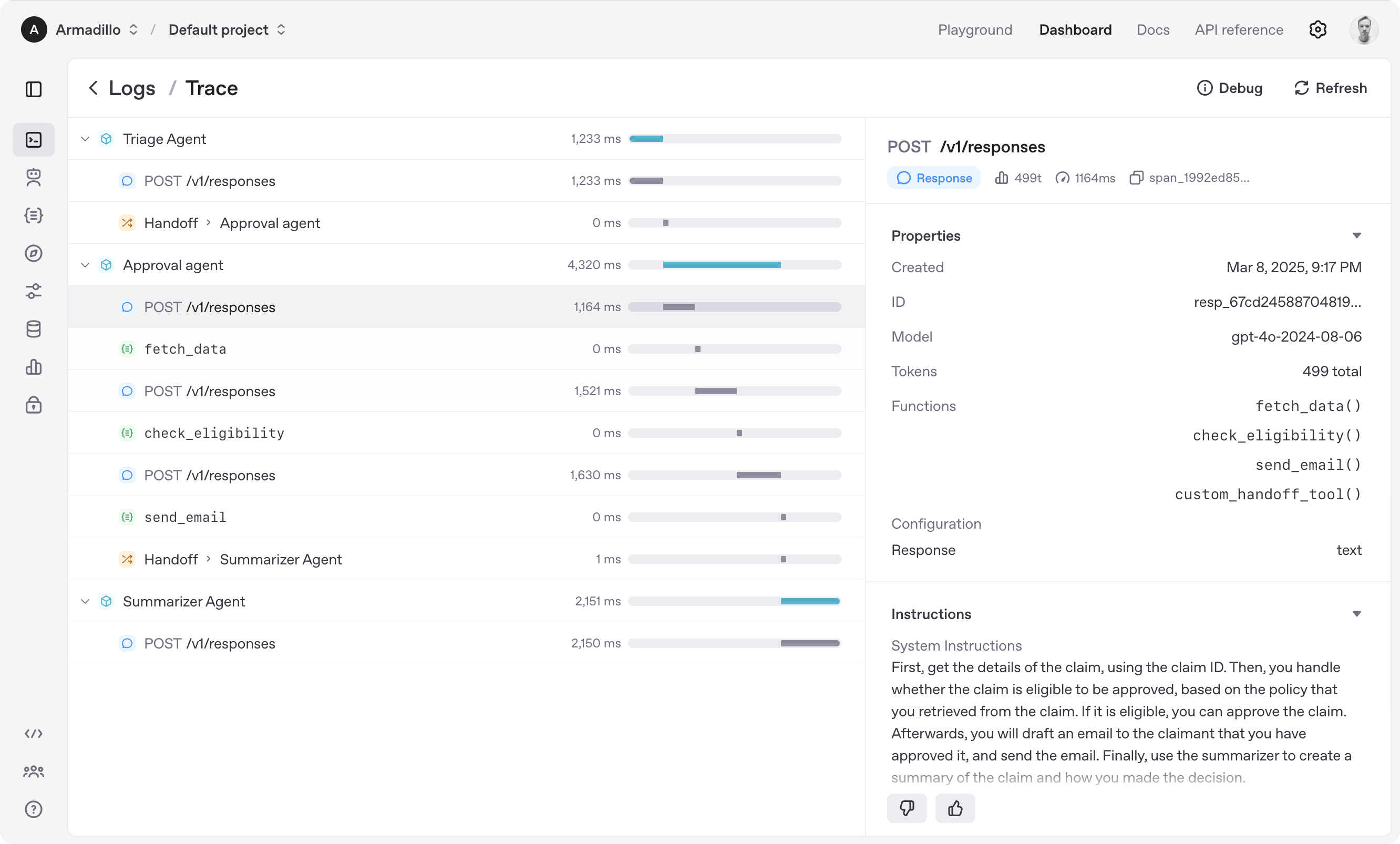
Built-in tracking of agent runs, allowing you to view, debug and optimize your workflows.
内置的智能体运行追踪功能,允许您查看、调试和优化工作流。
9. 实时智能体 (Realtime Agents)
Build powerful voice agents with gpt-realtime-1.5 and full agent features.
使用
gpt-realtime-1.5和完整的智能体功能构建强大的语音智能体。
快速开始
环境准备与安装
To get started, set up your Python environment (Python 3.10 or newer required), and then install OpenAI Agents SDK package.
首先,设置您的 Python 环境(需要 Python 3.10 或更高版本),然后安装 OpenAI Agents SDK 包。
使用 venv (推荐)
python -m venv .venv
source .venv/bin/activate  # On Windows: .venv\Scripts\activate
pip install openai-agents
使用 uv (更快的包管理器)
If you're familiar with uv, installing the package would be even easier:
如果您熟悉 uv,安装过程会更加简便:
uv init
uv add openai-agents
可选功能安装
| 功能 | 安装命令 (pip) | 安装命令 (uv) | 描述 |
|---|---|---|---|
| 语音支持 | pip install 'openai-agents[voice]' |
uv add 'openai-agents[voice]' |
启用实时语音智能体功能 |
| Redis 会话支持 | pip install 'openai-agents[redis]' |
uv add 'openai-agents[redis]' |
使用 Redis 进行分布式会话管理 |
运行您的第一个沙盒智能体
Sandbox Agents are new in version 0.14.0. A sandbox agent is an agent that uses a computer environment to perform real work with a filesystem, in an environment you configure and control. Sandbox agents are useful when the agent needs to inspect files, run commands, apply patches, or carry workspace state across longer tasks.
沙盒智能体 是 0.14.0 版本的新功能。沙盒智能体是一种使用计算机环境在您配置和控制的文件系统中执行实际工作的智能体。当智能体需要检查文件、运行命令、应用补丁或在较长时间任务中保持工作区状态时,沙盒智能体非常有用。
以下是一个简单的示例,展示如何创建一个沙盒智能体来检查 Git 仓库:
from agents import Runner
from agents.run import RunConfig
from agents.sandbox import Manifest, SandboxAgent, SandboxRunConfig
from agents.sandbox.entries import GitRepo
from agents.sandbox.sandboxes import UnixLocalSandboxClient

agent = SandboxAgent(
    name="Workspace Assistant",
    instructions="Inspect the sandbox workspace before answering.",
    default_manifest=Manifest(
        entries={
            "repo": GitRepo(repo="openai/openai-agents-python", ref="main"),
        }
    ),
)

result = Runner.run_sync(
    agent,
    "Inspect the repo README and summarize what this project does.",
    # Run this agent on the local filesystem
    run_config=RunConfig(sandbox=SandboxRunConfig(client=UnixLocalSandboxClient())),
)
print(result.final_output)

# This project provides a Python SDK for building multi-agent workflows.
[!IMPORTANT]
运行此代码前,请确保已设置OPENAI_API_KEY环境变量。
[!TIP]
Jupyter notebook 用户可参考 hello_world_jupyter.ipynb 示例。
项目依赖与致谢
核心开源依赖
We'd like to acknowledge the excellent work of the open-source community, especially:
我们感谢开源社区的卓越贡献,特别是:
| 项目 | 用途 | 链接 |
|---|---|---|
| Pydantic | 数据验证与设置管理 | 官网 |
| Requests | HTTP 请求库 | GitHub |
| MCP Python SDK | 模型上下文协议支持 | GitHub |
| Griffe | API 文档生成 | GitHub |
可选依赖
This library has these optional dependencies:
本库包含以下可选依赖:
| 依赖项 | 功能 | 链接 |
|---|---|---|
| websockets | WebSocket 通信支持 | GitHub |
| SQLAlchemy | 数据库会话管理 | GitHub |
| any-llm & LiteLLM | 多 LLM 提供商支持 | GitHub, GitHub |
开发与构建工具
We also rely on the following tools to manage the project:
我们还依赖以下工具来管理项目:
| 工具类别 | 工具名称 | 用途 |
|---|---|---|
| 包管理与代码质量 | uv, ruff | 快速包安装与代码格式化 |
| 类型检查 | mypy, Pyright | 静态类型检查与验证 |
| 测试与覆盖率 | pytest, Coverage.py | 单元测试与代码覆盖率分析 |
| 文档生成 | MkDocs | 项目文档网站构建 |
We're committed to continuing to build the Agents SDK as an open source framework so others in the community can expand on our approach.
我们致力于将 Agents SDK 作为一个开源框架持续构建,以便社区中的其他人能够在此基础上进行扩展。
下一步
Explore the examples directory to see the SDK in action, and read our documentation for more details.
常见问题(FAQ)
OpenAI Agents SDK 主要能用来做什么?
它是一个轻量级、提供商无关的 Python 框架,专门用于构建具有沙盒代理、工具、护栏和实时语音支持等功能的多智能体工作流。
沙盒智能体有什么特别之处?
沙盒智能体是预配置在容器环境中工作的智能体,能够执行长时间任务,例如检查文件、运行命令或应用补丁,非常适合需要保持工作区状态的操作。
如何为我的智能体工作流添加安全检查?
框架内置了“护栏”功能,提供可配置的输入和输出验证安全检查,确保智能体交互符合预设的安全和合规要求。
版权与免责声明:本文仅用于信息分享与交流,不构成任何形式的法律、投资、医疗或其他专业建议,也不构成对任何结果的承诺或保证。
文中提及的商标、品牌、Logo、产品名称及相关图片/素材,其权利归各自合法权利人所有。本站内容可能基于公开资料整理,亦可能使用 AI 辅助生成或润色;我们尽力确保准确与合规,但不保证完整性、时效性与适用性,请读者自行甄别并以官方信息为准。
若本文内容或素材涉嫌侵权、隐私不当或存在错误,请相关权利人/当事人联系本站,我们将及时核实并采取删除、修正或下架等处理措施。 也请勿在评论或联系信息中提交身份证号、手机号、住址等个人敏感信息。