OpenClaw如何部署?2026年11种方法成本优化77%安全指南

AI Summary (BLUF)
OpenClaw is a rapidly growing open-source personal AI assistant runtime that can be deployed locally or on cloud servers, connecting to various messaging platforms. This comprehensive guide details 11 deployment methods, analyzes token cost optimization strategies to reduce expenses by up to 77%, and addresses critical security vulnerabilities with official mitigation solutions.
原文翻译: OpenClaw 是一个快速发展的开源个人AI助手运行时,可在本地或云服务器上部署,并连接多种消息平台。本指南详细介绍了11种部署方法,分析了可将成本降低高达77%的Token优化策略,并针对关键安全漏洞提供了官方的缓解解决方案。
Document Version: February 2026 | OpenClaw Version: 2026.2.8+ Compiled from 20+ Chinese and English technical articles and official documentation
引言:全文概要
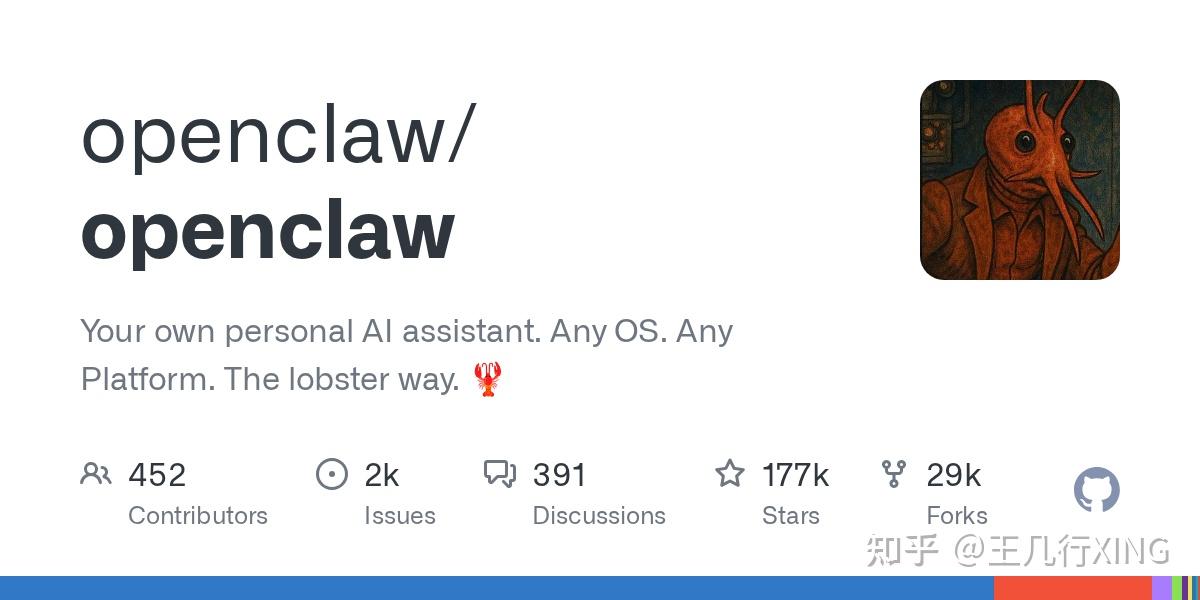
OpenClaw 是 2026 年初爆火的开源个人 AI 助手项目(GitHub 两周突破 15 万 Star),它能在你自己的设备上运行,并接入 WhatsApp、Telegram、飞书、钉钉等十余种消息平台,充当 7×24 小时的全能 AI Agent。本文综合 20 余篇中英文技术资料,从部署、成本、安全三个维度对 OpenClaw 做了系统性梳理。以下是核心要点速览:
OpenClaw is an explosively popular open-source personal AI assistant project that emerged in early 2026 (GitHub surpassed 150k stars in two weeks). It runs on your own hardware and connects to over a dozen messaging platforms like WhatsApp, Telegram, Lark, and DingTalk, serving as a 24/7 all-purpose AI Agent. This article synthesizes over 20 Chinese and English technical resources, providing a systematic overview of OpenClaw from three dimensions: deployment, cost, and security. Below is a quick summary of the core points:
部署方式
本文覆盖了 11 种部署路径,可归纳为四大类:
This article covers 11 deployment paths, which can be categorized into four main types:
- 本地一键安装(
curl | bash或npm install -g openclaw):5 分钟上手,零基础设施成本,适合个人体验。Local One-Click Installation (
curl | bashornpm install -g openclaw): Get started in 5 minutes with zero infrastructure cost, ideal for personal experimentation. - Mac Mini 本地部署:以 800–2,000 美金的一次性硬件投入换取零云端费用——搭配 Ollama 运行本地模型后,日常使用成本可降至 0 美金/月。64GB 的 M4 Pro 可流畅运行 32B 参数模型。
Mac Mini Local Deployment: A one-time hardware investment of $800–2,000 eliminates cloud fees. When paired with Ollama to run local models, the ongoing monthly cost can drop to $0/month. An M4 Pro with 64GB RAM can smoothly run 32B parameter models.
- 云服务器 / 在线虚拟机:阿里云(68 元/年起)、腾讯云(99 元/年起)均提供预装镜像一键部署;海外用户可选 DigitalOcean 1-Click、Railway、Render 等平台,最低免费起步。
Cloud Server / Online VM: Alibaba Cloud (from ¥68/year) and Tencent Cloud (from ¥99/year) offer one-click deployment via pre-installed images. Overseas users can choose platforms like DigitalOcean 1-Click, Railway, Render, etc., with free tiers available.
- Docker 容器化 / macOS VM(Lume):安全性与隔离性最优的方案,适合生产环境和需要 iMessage 集成的场景。
Docker Containerization / macOS VM (Lume): The optimal solution for security and isolation, suitable for production environments and scenarios requiring iMessage integration.
Token 成本
OpenClaw 本身免费开源,真正的成本来自 LLM API 调用,且极易超支:
OpenClaw itself is free and open-source. The real cost comes from LLM API calls, which can easily exceed budgets:
- 一个配置不当的”心跳”检查(每 30 分钟一次),一晚可烧掉 18.75 美金;有用户单日”待机”消耗 5000 万 Tokens(约 11 美金)。
A misconfigured "heartbeat" check (every 30 minutes) can burn through $18.75 in one night; some users have reported consuming 50 million Tokens (approx. $11) in a single day while "idle".
- 成本六大来源:上下文累积(40–50%)、工具输出存储(20–30%)、系统提示词(10–15%)、多轮推理、模型选择、心跳任务。
Six major cost sources: Context accumulation (40–50%), Tool output storage (20–30%), System prompts (10–15%), Multi-turn reasoning, Model selection, Heartbeat tasks.
- 优化组合可降低 77%——通过会话重置、智能模型路由(Haiku/Gemini Flash 处理日常任务)、上下文窗口限制、本地模型回退等策略,实测从 150 美金/月降至 35 美金/月。
Optimization can reduce costs by 77% – Through strategies like session resetting, intelligent model routing (using Haiku/Gemini Flash for daily tasks), context window limiting, and local model fallback, real-world tests show reductions from $150/month to $35/month.
安全风险
安全是 OpenClaw 当前最大的短板,已发生多起严重事件:
Security is currently OpenClaw's most significant weakness, with several serious incidents already occurring:
- CVE-2026-25253(CVSS 8.8):跨站 WebSocket 劫持导致一键远程代码执行,攻击者仅需受害者点击一个恶意链接,即可在毫秒内接管整个 Gateway 并在宿主机上执行任意命令。已在 v2026.1.29 修复。
CVE-2026-25253 (CVSS 8.8): Cross-site WebSocket hijacking leading to one-click remote code execution. An attacker only needs the victim to click a malicious link to take over the entire Gateway and execute arbitrary commands on the host machine within milliseconds. Fixed in v2026.1.29.
- 923 个网关暴露:Shodan 扫描发现近千个 OpenClaw 实例以零认证模式暴露在公网上,API Key 和对话记录均可被窃取。
923 Gateways Exposed: Shodan scans revealed nearly a thousand OpenClaw instances exposed on the public internet with zero authentication, allowing API Keys and conversation logs to be stolen.
- 恶意 VS Code 扩展:名为 “ClawdBot Agent” 的扩展被植入远程访问木马。
Malicious VS Code Extension: An extension named "ClawdBot Agent" was found to contain a Remote Access Trojan (RAT).
- 此外还有第三方技能包钓鱼、Moltbook 数据库泄露、1600 万美金加密货币诈骗等事件。
Other incidents include third-party skill package phishing, Moltbook database leaks, and a $16 million cryptocurrency scam.
官方安全方案
官方已推出多层防御措施:auth: "none" 模式被永久移除、Docker 沙箱隔离(只读根文件系统 + 无网络 + 非 root 运行)、openclaw security audit --deep 自动安全审计、DM 四级访问策略(pairing/allowlist/open/disabled)、多 Agent 分级权限控制,以及完整的事件响应流程。
The official team has introduced multi-layered defense measures: the
auth: "none"mode has been permanently removed, Docker sandbox isolation (read-only root filesystem + no network + non-root execution),openclaw security audit --deepautomated security auditing, a four-level DM access policy (pairing/allowlist/open/disabled), multi-agent hierarchical permission control, and a complete incident response process.
一句话建议:OpenClaw 功能强大但安全形势严峻——部署前请务必升级到最新版本、启用 Token 认证、开启 Docker 沙箱、在供应商侧设置硬性 API 支出限制,并定期运行安全审计。
One-Line Recommendation: OpenClaw is powerful but faces serious security challenges—before deployment, ensure you upgrade to the latest version, enable token authentication, activate Docker sandboxing, set hard API spending limits with your provider, and run security audits regularly.
一、项目概述
什么是 OpenClaw?
OpenClaw(原名 Clawdbot → Moltbot → OpenClaw)是一个开源的个人 AI 助手运行时,由 PSPDFKit 创始人 Peter Steinberger 于 2026 年初发起。项目在 72 小时内增长超过 6 万 Star,2 周内突破 15 万 Star,成为 GitHub 史上增长最快的开源项目之一。
OpenClaw (formerly Clawdbot → Moltbot → OpenClaw) is an open-source personal AI assistant runtime initiated by Peter Steinberger, founder of PSPDFKit, in early 2026. The project gained over 60,000 stars in 72 hours and surpassed 150,000 stars within 2 weeks, making it one of the fastest-growing open-source projects in GitHub history.
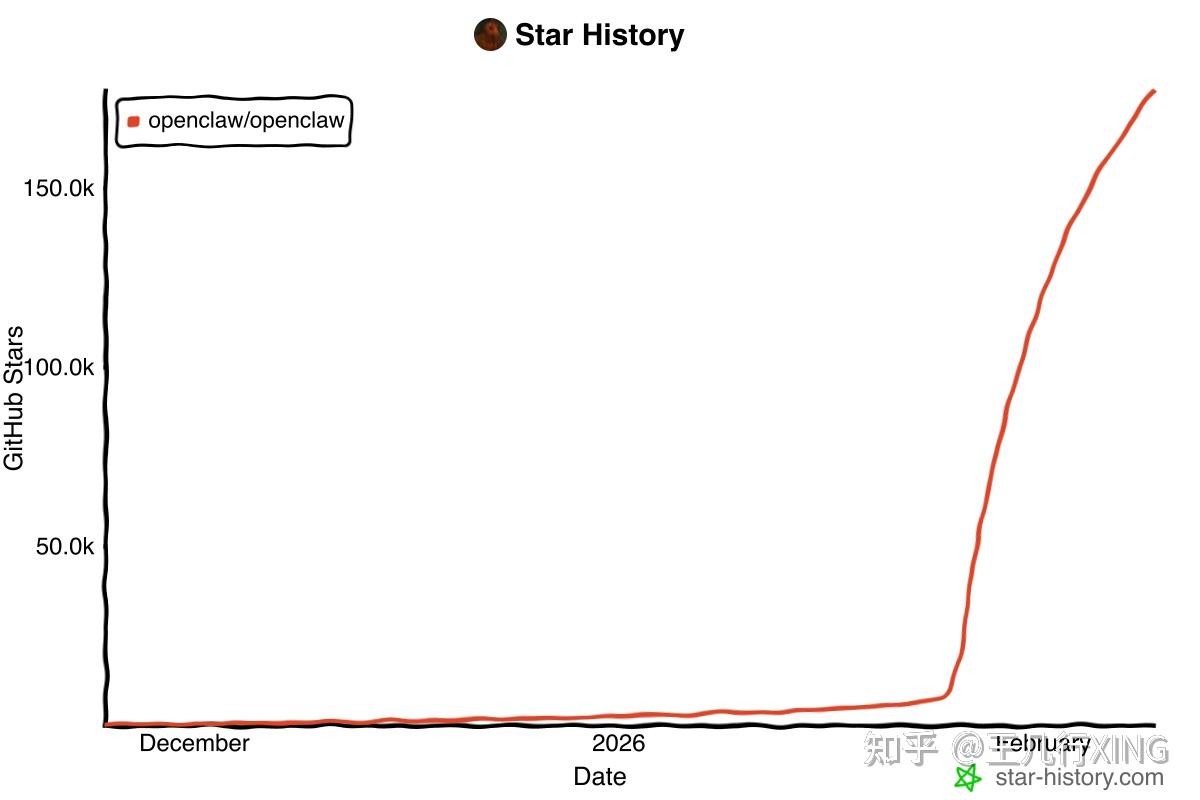
核心定位:在你自己的设备上运行的 AI Agent,连接各种消息平台(WhatsApp、Telegram、Slack、Discord、Signal、iMessage、飞书、钉钉等),提供 24⁄7 全天候的 AI 助手体验。
Core Positioning: An AI Agent that runs on your own devices, connecting to various messaging platforms (WhatsApp, Telegram, Slack, Discord, Signal, iMessage, Lark, DingTalk, etc.), providing a 24/7 AI assistant
版权与免责声明:本文仅用于信息分享与交流,不构成任何形式的法律、投资、医疗或其他专业建议,也不构成对任何结果的承诺或保证。
文中提及的商标、品牌、Logo、产品名称及相关图片/素材,其权利归各自合法权利人所有。本站内容可能基于公开资料整理,亦可能使用 AI 辅助生成或润色;我们尽力确保准确与合规,但不保证完整性、时效性与适用性,请读者自行甄别并以官方信息为准。
若本文内容或素材涉嫌侵权、隐私不当或存在错误,请相关权利人/当事人联系本站,我们将及时核实并采取删除、修正或下架等处理措施。 也请勿在评论或联系信息中提交身份证号、手机号、住址等个人敏感信息。