RAG-Anything如何实现多模态知识检索?2026年最新技术解析

AI Summary (BLUF)
RAG-Anything is an open-source framework developed by HKU researchers that enables unified multimodal retrieval-augmented generation, allowing AI systems to understand and retrieve knowledge from text
引言:为何 RAG-Anything 正在彻底改变 AI 知识检索
如果您在处理大型语言模型(Large Language Models, LLMs)时,因其在多模态内容上的局限性而感到困扰,那么本文将为您提供解决方案。本文将介绍一项正在真正改变人工智能工程领域格局的技术。
If you are frustrated by the limitations of Large Language Models (LLMs) when dealing with multimodal content, this article provides a solution. We introduce a technology that is genuinely reshaping the landscape of AI engineering.
传统的检索增强生成(Retrieval-Augmented Generation, RAG)系统局限于纯文本世界。但现实情况是,现代知识已不再仅仅以纯文本形式存在。您公司的文档中包含图表、示意图、表格、数学方程式和图像,这些元素共同协作以传达复杂的含义。当您的 RAG 系统只能读取文本而忽略其他所有内容时,您正在丢失关键信息。
Traditional Retrieval-Augmented Generation (RAG) systems are confined to the world of pure text. However, the reality is that modern knowledge no longer exists solely in textual form. Your company's documents contain charts, diagrams, tables, mathematical equations, and images—elements that work together to convey complex meanings. When your RAG system can only read text and ignores everything else, you are losing critical information.
这正是 RAG-Anything 发挥作用的地方。该框架由香港大学的研究人员开发,是首个真正统一的多模态检索增强生成开源框架。它不仅处理文本,还能理解并从图像、表格、图表、数学表达式及其相互关联中检索知识。
This is where RAG-Anything comes into play. Developed by researchers at the University of Hong Kong, this framework is the first truly unified, open-source multimodal RAG framework. It not only processes text but also understands and retrieves knowledge from images, tables, charts, mathematical expressions, and their interrelationships.
在本篇综合指南中, 笔者将详细介绍您需要了解的关于 RAG-Anything 的一切:其架构、实现细节、真实世界用例以及上手代码示例。无论您是数据工程师、AI 研究员还是机器学习工程师,都将学会如何构建生产级的多模态 RAG 系统。
In this comprehensive guide, we will detail everything you need to know about RAG-Anything: its architecture, implementation specifics, real-world use cases, and hands-on code examples. Whether you are a data engineer, AI researcher, or machine learning engineer, you will learn how to build a production-grade multimodal RAG system.
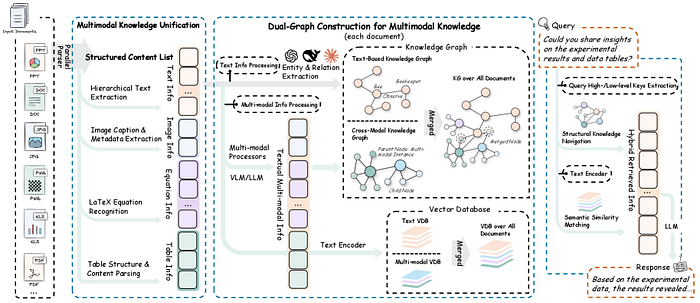
A universal RAG framework, RAG-Anything, developed by Guo Yirui, Ren Xubin, Xu Lingrui, Zhang Jiahao, Huang Chao, and others from the University of Hong Kong.
理解 RAG-Anything 的基本原理
传统 RAG 系统的问题
在深入探讨 RAG-Anything 之前,我们首先需要理解当前 RAG 实现中存在的缺陷。传统的检索增强生成工作流程如下:
Before diving into RAG-Anything, we must first understand the shortcomings present in current RAG implementations. The traditional Retrieval-Augmented Generation workflow is as follows:
标准 RAG 流水线:
Standard RAG Pipeline:
- 将文档分块为文本片段 (Chunk documents into text segments)
- 使用如 OpenAI 的
text-embedding-ada-002等模型将文本块嵌入(embed)(Embed text chunks using models like OpenAI'stext-embedding-ada-002) - 将嵌入向量存储在向量数据库(vector databases)中(如 Pinecone, Weaviate, ChromaDB)(Store embedding vectors in vector databases (e.g., Pinecone, Weaviate, ChromaDB))
- 对用户查询进行嵌入,并与存储的向量进行匹配 (Embed user queries and match them against stored vectors)
- 将检索到的文本块提供给 LLM 用于生成答案 (Feed retrieved text chunks to an LLM to generate answers)
这听起来不错,对吗?但问题在于:这套流程只对文本有效。当您处理一个包含财务表格、科学图表或建筑蓝图的 PDF 文件时,传统的 RAG 系统要么完全跳过这些元素,要么将它们转换为丢失了关键结构信息的文本描述。
This sounds good, right? The problem is: this process only works for text. When you process a PDF containing financial tables, scientific charts, or architectural blueprints, traditional RAG systems either skip these elements entirely or convert them into textual descriptions that lose critical structural information.
RAG-Anything 解决方案:统一的多模态知识检索
RAG-Anything 从根本上重塑了我们对知识检索的认知。它不再将不同模态视为独立的数据类型,而是将它们概念化为统一图结构中的相互关联的知识实体。
RAG-Anything fundamentally reshapes our understanding of knowledge retrieval. Instead of treating different modalities as separate data types, it conceptualizes them as interconnected knowledge entities within a unified graph structure.
核心创新: 构建双图结构(dual-graph),该结构能够捕捉:
Core Innovation: Constructs a dual-graph structure capable of capturing:
- 跨模态关系(cross-modal relationships)(例如,图像如何与表格关联,方程式如何与文本连接)(Cross-modal relationships (e.g., how an image relates to a table, how an equation connects to text))
- 文本语义(textual semantics)(传统的语义理解)(Textual semantics (traditional semantic understanding))
- 结构化知识(structural knowledge)(布局、层次结构、空间关系)(Structural knowledge (layout, hierarchy, spatial relationships))
这意味着当您提问“第三季度的收入增长是多少?”时,RAG-Anything 不仅仅搜索文本——它能理解答案可能存在于条形图、财务表格或两者的结合中,并且知道如何智能地导航这些关系。
This means when you ask, "What was the revenue growth in Q3?" RAG-Anything doesn't just search text—it understands that the answer might reside in a bar chart, a financial table, or a combination of both, and knows how to intelligently navigate these relationships.
核心架构:RAG-Anything 的工作原理
接下来,我们将技术架构分解为易于理解的组件。理解这些组件将帮助您根据特定用例实现和定制 RAG-Anything。
Next, we break down the technical architecture into digestible components. Understanding these will help you implement and customize RAG-Anything for your specific use case.
1. 多阶段多模态流水线
RAG-Anything 实现了一个复杂的多阶段流水线,扩展了传统的 RAG 架构:
RAG-Anything implements a sophisticated multi-stage pipeline that extends the traditional RAG architecture:
阶段 1:文档解析与模态检测
Stage 1: Document Parsing and Modality Detection
# 概念流程 - 实际实现使用专门的解析器
document_elements = {
    'text_blocks': [],
    'images': [],
    'tables': [],
    'equations': [],
    'charts': [],
    'diagrams': []
}
# 每个元素都维护空间和语义元数据
for element in parsed_document:
    element_type = detect_modality(element)
    element_metadata = {
        'position': get_spatial_coordinates(element),
        'context': extract_surrounding_context(element),
        'relationships': identify_cross_references(element)
    }
    document_elements[element_type].append({
        'content': element,
        'metadata': element_metadata
    })
阶段 2:双图构建
Stage 2: Dual-Graph Construction
这是 RAG-Anything 的核心创新所在。该框架构建了两个相互关联的图:
This is the core innovation of RAG-Anything. The framework constructs two interconnected graphs:
知识图谱(Knowledge Graph, 跨模态):
Knowledge Graph (Cross-modal):
- 节点代表不同模态的元素(文本段落、图像、表格)(Nodes represent elements of different modalities (text paragraphs, images, tables))
- 边代表关系(引用、解释、依赖)(Edges represent relationships (references, explains, depends on))
- 捕捉关于信息如何在不同模态间流动的结构化知识 (Captures structured knowledge about how information flows across modalities)
语义图谱(Semantic Graph, 文本):
Semantic Graph (Textual):
- 节点代表从文本中提取的语义概念 (Nodes represent semantic concepts extracted from text)
- 边代表语义关系 (Edges represent semantic relationships)
- 支持传统的语义搜索能力 (Supports traditional semantic search capabilities)
# 简化的双图表示
class DualGraph:
    def __init__(self):
        self.knowledge_graph = nx.DiGraph()  # 跨模态关系
        self.semantic_graph = nx.DiGraph()   # 语义关系

    def add_multimodal_node(self, element, modality_type):
        # 将节点及其模态元数据添加到知识图谱
        self.knowledge_graph.add_node(
            element.id,
            content=element.content,
            modality=modality_type,
            embeddings=self.generate_embeddings(element, modality_type)
        )
        # 如果是文本,也添加到语义图谱
        if modality_type == 'text':
            semantic_concepts = self.extract_concepts(element.content)
            for concept in semantic_concepts:
                self.semantic_graph.add_node(concept)
                self.semantic_graph.add_edge(element.id, concept)

    def add_cross_modal_edge(self, source_id, target_id, relationship_type):
        self.knowledge_graph.add_edge(
            source_id,
            target_id,
            relationship=relationship_type,
            weight=self.calculate_relationship_strength(source_id, target_id)
        )
阶段 3:跨模态混合检索
Stage 3: Cross-Modal Hybrid Retrieval
这是结合了结构化导航和语义匹配的检索引擎:
This is the retrieval engine that combines structured navigation with semantic matching:
class CrossModalRetriever:
    def __init__(self, dual_graph, embedding_model):
        self.dual_graph = dual_graph
        self.embedding_model = embedding_model

    def retrieve(self, query, top_k=5):
        # 步骤 1: 语义匹配
        query_embedding = self.embedding_model.encode(query)
        semantic_candidates = self.semantic_search(query_embedding, top_k * 2)

        # 步骤 2: 基于图的扩展
        expanded_candidates = []
        for candidate in semantic_candidates:
            # 导航知识图谱以查找相关的多模态内容
            related_nodes = self.dual_graph.get_neighbors(
                candidate.id,
                max_hops=2,
                relationship_types=['references', 'explains', 'visualizes']
            )
            expanded_candidates.extend(related_nodes)

        # 步骤 3: 使用跨模态相关性进行重排序
        reranked_results = self.cross_modal_rerank(
            query,
            expanded_candidates,
            top_k
        )
        return reranked_results

    def cross_modal_rerank(self, query, candidates, top_k):
        scores = []
        for candidate in candidates:
            # 计算多因素相关性分数
            semantic_score = self.calculate_semantic_similarity(query, candidate)
            structural_score = self.calculate_structural_relevance(candidate)
            modality_score = self.calculate_modality_importance(candidate, query)

            combined_score = (
                0.5 * semantic_score +
                0.3 * structural_score +
                0.2 * modality_score
            )
            scores.append((candidate, combined_score))

        # 返回得分最高的 top-k 个候选项
        return sorted(scores, key=lambda x: x[1], reverse=True)[:top_k]
2. 多模态嵌入策略
RAG-Anything 为不同模态使用专门的嵌入模型:
RAG-Anything employs specialized embedding models for different modalities:
| 模态 (Modality) | 推荐模型 (Recommended Model) | 核心能力 (Core Capability) |
|---|---|---|
| 文本 (Text) | BERT, RoBERTa, 领域特定 Transformer | 捕捉语义和上下文 (Captures semantics and context) |
| 图像 (Image) | CLIP, ViT (Vision Transformer) | 理解视觉内容及其与文本的关系 (Understands visual content and its relation to text) |
| 表格 (Table) | 保留结构的自定义表格编码器 (Custom table encoder preserving structure) | 同时捕捉内容和布局信息 (Captures both content and layout information) |
| 方程式 (Equation) | 支持 LaTeX 的编码器 (LaTeX-aware encoder) | 理解数学关系 (Understands mathematical relationships) |
class MultiModalEmbedder:
    def __init__(self):
        self.text_encoder = SentenceTransformer('all-MiniLM-L6-v2')
        self.image_encoder = CLIPModel.from_pretrained('openai/clip-vit-base-patch32')
        self.table_encoder = TableEncoder()  # 自定义实现

    def embed(self, content, modality_type):
        if modality_type == 'text':
            return self.text_encoder.encode(content)
        elif modality_type == 'image':
            return self.image_encoder.encode_image(content)
        elif modality_type == 'table':
            return self.table_encoder.encode(content)
        elif modality_type == 'equation':
            return self.embed_equation(content)

    def embed_equation(self, latex_content):
        # 将 LaTeX 转换为结构化表示
        parsed_equation = self.parse_latex(latex_content)
        # 编码结构和符号
        return self.equation_encoder.encode(parsed_equation)
搭建 RAG-Anything:安装与配置 🛠️
让我们开始动手实践!笔者将引导您从零开始搭建 RAG-Anything。
Let's get hands-on! We will guide you through setting up RAG-Anything from scratch.
前置条件
在开始之前,请确保您已具备:
Before starting, ensure you have:
- Python 3.8 或更高版本 (Python 3.8 or higher)
- 支持 CUDA 的 GPU(生产环境推荐,CPU 可用于测试)(CUDA-capable GPU (recommended for production, CPU works for testing))
- 至少 16GB RAM(处理大型文档建议 32GB)(At least 16GB RAM (32GB recommended for large documents))
- 已安装 Git (Git installed)
步骤 1:克隆代码仓库
Step 1: Clone the Repository
# 克隆 RAG-Anything 代码仓库
git clone https://github.com/HKUDS/RAG-Anything.git
cd RAG-Anything
# 创建虚拟环境(强烈推荐)
python -m venv venv
source venv/bin/activate  # Windows 系统: venv\Scripts\activate
步骤 2:安装依赖项
Step 2: Install Dependencies
# 安装核心依赖
pip install -r requirements.txt
# 为特定用例安装额外包
pip install torch torchvision  # GPU 支持
pip install transformers sentence-transformers  # 嵌入模型
pip install networkx matplotlib  # 图操作与可视化
pip install pymupdf pillow  # 文档解析
pip install chromadb  # 向量存储
步骤 3:环境配置
Step 3: Environment Configuration
在项目根目录下创建一个 .env 文件:
Create a
.envfile in the project root directory:
# 复制环境文件示例
cp env.example .env
编辑 .env 文件并填入您的配置:
Edit the
.envfile and fill in your configuration:
# API 密钥(如果使用云服务)
OPENAI_API_KEY=your_openai_key_here
ANTHROPIC_API_KEY=your_anthropic_key_here

# 模型配置
TEXT_EMBEDDING_MODEL=all-MiniLM-L6-v2
IMAGE_EMBEDDING_MODEL=openai/clip-vit-base-patch32
LLM_MODEL=gpt-4  # 或 claude-3-opus, llama-2-70b 等

# 向量数据库
VECTOR_DB_TYPE=chromadb  # 可选项: chromadb, pinecone, weaviate
VECTOR_DB_PATH=./data/vector_store

# 处理配置
MAX_CHUNK_SIZE=512
CHUNK_OVERLAP=50
MAX_WORKERS=4

# 图配置
GRAPH_MAX_HOPS=2
GRAPH_RELATIONSHIP_THRESHOLD=0.7
步骤 4:验证安装
Step 4: Verify Installation
# test_installation.py
from raganything import RAGAnything
from raganything.parsers import DocumentParser
from raganything.embedders import MultiModalEmbedder

def test_installation():
    print("正在测试 RAG-Anything 安装...")
    # 初始化组件
    try:
        parser = DocumentParser()
        embedder = MultiModalEmbedder()
        rag = RAGAnything()
        print("✅ 所有组件初始化成功!")
        return True
    except Exception as e:
        print(f"❌ 安装测试失败: {str(e)}")
        return False

if __name__ == "__main__":
    test_installation()
运行测试:
Run the test:
python test_installation.py
构建您的第一个多模态 RAG 应用
现在,让我们构建一个完整的应用程序来演示 RAG-Anything 的能力。我们将创建一个能够回答关于包含文本、图表和表格的技术文档问题的系统。
Now, let's build a complete application to demonstrate the capabilities of RAG-Anything. We will create a system capable of answering questions about technical documents containing text, charts, and tables.
完整实现示例
Complete Implementation Example
# multimodal_rag_app.py
import os
from pathlib import Path
from raganything import RAGAnything
from raganything.parsers import DocumentParser
from raganything.embedders import MultiModalEmbedder
from raganything.retrievers import CrossModalRetriever
from raganything.generators import ResponseGenerator

class MultimodalRAGSystem:
    def __init__(self, config_path=None):
        """初始化多模态RAG系统"""
        self.config = self.load_config(config_path)
        self.parser = DocumentParser()
        self.embedder = MultiModalEmbedder()
        self.retriever = CrossModalRetriever(
            embedding_model=self.embedder,
            top_k=self.config.get('top_k', 5)
        )
        self.generator = ResponseGenerator(
            model_name=self.config.get('llm_model', 'gpt-4')
        )
        self.knowledge_base = None

    def load_config(self, config_path):
        """从文件或环境变量加载配置"""
        if config_path and os.path.exists(config_path):
            import json
            with open(config_path, 'r') as f:
                return json.load(f)
        return {
            'top_k': int(os.getenv('TOP_K', 5)),
            'llm_model': os.getenv('LLM_MODEL', 'gpt-4'),
            'max_chunk_size': int(os.getenv('MAX_CHUNK_SIZE', 512))
        }

    def ingest_documents(self, document_paths):
        """
        接收并处理多模态文档
        Args:
            document_paths: 文档路径列表 (PDF, DOCX等)
        """
        print(f"📄 正在接收 {len(document_paths)} 个文档...")
        all_elements = []
        for doc_path in document_paths:
            print(f"  正在处理: {doc_path}")
            # 将文档解析为多模态元素
            elements = self.parser.parse(doc_path)
            # 为每个元素生成嵌入
            for element in elements:
                element['embedding'] = self.embedder.embed(
                    element['content'],
                    element['modality']
                )
            all_elements.extend(elements)

        # 构建双图知识库
        print("🔗 正在构建知识图谱...")
        self.knowledge_base = self.retriever.build_knowledge_base(all_elements)
        print(f"✅ 已接收 {len(all_elements)} 个多模态元素")
        return len(all_elements)

    def query(self, question, return_sources=True):
        """
        查询多模态知识库
        Args:
            question: 用户的问题
            return_sources: 是否返回源元素
        Returns:
            一个包含答案和可选来源的字典
        """
        if self.knowledge_base is None:
            raise ValueError("尚未接收任何文档。请先调用 ingest_documents()。")

        print(f"🔍 正在搜索: {question}")
        # 检索相关的多模态元素
        retrieved_elements = self.retriever.retrieve(
            query=question,
            knowledge_base=self.knowledge_base,
            top_k=self.config['top_k']
        )
        print(f"  找到 {len(retrieved_elements)} 个相关元素")

        # 使用检索到的上下文生成响应
        response = self.generator.generate(
            query=question,
            context_elements=retrieved_elements
        )

        result = {
            'answer': response['text'],
            'confidence': response.get('confidence', 0.0)
        }

        if return_sources:
            result['sources'] = self.format_sources(retrieved_elements)

        return result

    def format_sources(self, elements):
        """格式化检索到的元素以便显示"""
        sources = []
        for idx, element in enumerate(elements, 1):
            source = {
                'id': idx,
                'modality': element['modality'],
                'content_preview': self.get_preview(element),
                'relevance_score': element.get('score', 0.0),
                'metadata': element.get('metadata', {})
            }
            sources.append(source)
        return sources

    def get_preview(self, element):
        """获取元素内容的预览"""
        modality = element['modality']
        content = element['content']
        if modality == 'text':
            return content[:200] + '...' if len(content) > 200 else content
        elif modality == 'table':
            return f"包含 {len(content.get('rows', []))} 行的表格"
        elif modality == 'image':
            return f"图像: {element.get('metadata', {}).get('caption', '无标题')}"
        elif modality == 'equation':
            return f"方程式: {content[:100]}"
        else:
            return f"{modality.capitalize()} 元素"

# 使用示例
def main():
    # 初始化系统
    rag_system = MultimodalRAGSystem()

    # 接收文档
    documents = [
        './data/technical_manual.pdf',
        './data/research_paper.pdf',
        './data/financial_report.pdf'
    ]
    rag_system.ingest_documents(documents)

    # 查询系统
    questions = [
        "技术手册中描述的系统架构是什么?",
        "第三季度的收入数据是多少?",
        "解释一下研究论文中提出的数学模型"
    ]

    for question in questions:
        print(f"\n{'='*80}")
        print(f"问题: {question}")
        print('='*80)
        result = rag_system.query(question, return_sources=True)
        print(f"\n答案: {result['answer']}")
        print(f"置信度: {result['confidence']:.2%}")
        print("\n来源:")
        for source in result['sources']:
            print(f"  [{source['id']}] {source['modality'].upper()}")
            print(f"      预览: {source['content_preview']}")
            print(f"      相关性: {source['relevance_score']:.2%}")

if __name__ == "__main__":
    main()
高级文档解析器实现
Advanced Document Parser Implementation
以下是如何实现一个能处理多种格式的健壮文档解析器:
Here's how to implement a robust document parser capable of handling multiple formats:
# advanced_parser.py
import fitz  # PyMuPDF
from PIL import Image
import pandas as pd
import cv2
import numpy as np
from typing import Dict, List, Any
import re

class AdvancedDocumentParser:
    def __init__(self):
        self.modality_detectors = {
            'table': self.detect_table,
            'image': self.detect_image,
            'equation': self.detect_equation,
            'chart': self.detect_chart,
            'diagram': self.detect_diagram,
            'text': self.detect_text
        }

    def parse_pdf(self, pdf_path: str) -> List[Dict[str, Any]]:
        """解析PDF文档,提取多模态元素"""
        elements = []
        doc = fitz.open(pdf_path)

        for page_num in range(len(doc)):
            page = doc[page_num]
            # 提取文本块
            text_blocks = page.get_text("dict")["blocks"]
            for block in text_blocks:
                if block["type"] == 0:  # 文本块
                    element = self.process_text_block(block, page_num)
                    elements.append(element)
                elif block["type"] == 1:  # 图像块
                    element = self.process_image_block(block, page_num)
                    elements.append(element)

            # 检测表格
            tables = self.extract_tables_from_page(page, page_num)
            elements.extend(tables)

            # 检测图表和方程式
            charts_equations = self.detect_charts_and_equations(page, page_num)
            elements.extend(charts_equations)

        doc.close()
        return elements

    def process_text_block(self, block: Dict, page_num: int) -> Dict:
        """处理文本块,检测其中是否包含方程式"""
        text = block.get("lines", [{}])[0].get("spans", [{}])[0].get("text", "")
        bbox = block.get("bbox", (0, 0, 0, 0))

        # 检测文本中的方程式
        equations = self.extract_equations_from_text(text)
        if equations:
            # 如果包含方程式,将其分离
            return {
                'type': 'mixed',
                'content': {
                    'text': self.remove_equations_from_text(text, equations),
                    'equations': equations
                },
                'modality': ['text', 'equation'],
                'metadata': {
                    'page': page_num,
                    'bbox': bbox,
                    'font_size': block.get("lines", [{}])[0].get("spans", [{}])[0].get("size", 0)
                }
            }
        else:
            return {
                'type': 'text',
                'content': text,
                'modality': 'text',
                'metadata': {
                    'page': page_num,
                    'bbox': bbox,
                    'font_size': block.get("lines", [{}])[0].get("spans", [{}])[0].get("size", 0)
                }
            }

    def extract_tables_from_page(self, page, page_num: int) -> List[Dict]:
        """使用计算机视觉和启发式方法从页面提取表格"""
        tables = []
        try:
            # 将页面转换为图像进行表格检测
            pix = page.get_pixmap()
            img_data = pix.tobytes("png")
            nparr = np.frombuffer(img_data, np.uint8)
            img = cv2.imdecode(nparr, cv2.IMREAD_COLOR)

            # 使用OpenCV检测表格线
            gray = cv2.cvtColor(img, cv2.COLOR_BGR2GRAY)
            edges = cv2.Canny(gray, 50, 150, apertureSize=3)
            lines = cv2.HoughLinesP(edges, 1, np.pi/180, 100, minLineLength=100, maxLineGap=10)

            if lines is not None:
                # 检测到的线条可能表示表格结构
                table_regions = self.cluster_lines_into_tables(lines)
                for region in table_regions:
                    tables.append({
                        'type': 'table',
                        'content': self.extract_table_content(page, region),
                        'modality': 'table',
                        'metadata': {
                            'page': page_num,
                            'bbox': region,
                            'detection_method': 'cv_hough_lines'
                        }
                    })
        except Exception as e:
            print(f"表格提取错误: {e}")

        return tables

    def detect_charts_and_equations(self, page, page_num: int) -> List[Dict]:
        """检测页面中的图表和独立方程式"""
        elements = []
        # 获取页面中的所有图像
        image_list = page.get_images()
        for img_index, img in enumerate(image_list):
            xref = img[0]
            base_image = page.parent.extract_image(xref)
            image_bytes = base_image["image"]
            image_ext = base_image["ext"]

            # 使用图像分类模型判断是否为图表/示意图
            is_chart = self.classify_image_type(image_bytes)
            if is_chart:
                elements.append({
                    'type': 'chart',
                    'content': image_bytes,
                    'modality': 'chart',
                    'metadata': {
                        'page': page_num,
                        'image_index': img_index,
                        'format': image_ext,
                        'classification': 'chart'
                    }
                })

        return elements

    def classify_image_type(self, image_bytes: bytes) -> bool:
        """简单启发式方法判断图像是否为图表"""
        # 在实际应用中,这里应该使用训练好的分类模型
        # 这里使用简单的尺寸和颜色启发式方法
        try:
            img = Image.open(io.BytesIO(image_bytes))
            width, height = img.size
            # 图表通常具有特定的宽高比和颜色分布
            aspect_ratio = width / height
            if 0.5 < aspect_ratio < 2.0:  # 合理的图表宽高比
                # 转换为numpy数组进行进一步分析
                img_array = np.array(img)
                # 检查颜色数量(图表通常颜色较少)
                unique_colors = len(np.unique(img_array.reshape(-1, img_array.shape[2]), axis=0))
                if unique_colors < 100:  # 图表通常颜色较少
                    return True
        except:
            pass
        return False

    def extract_equations_from_text(self, text: str) -> List[str]:
        """使用正则表达式从文本中提取LaTeX方程式"""
        # 匹配常见的LaTeX方程式模式
        equation_patterns = [
            r'\$[^$]+\$',  # 行内方程式
            r'\\\[.*?\\\]',  # 显示方程式
            r'\\begin\{equation\}.*?\\end\{equation\}',  # 方程式环境
            r'\\begin\{align\}.*?\\end\{align\}',  # 对齐环境
        ]

        equations = []
        for pattern in equation_patterns:
            matches = re.findall(pattern, text, re.DOTALL)
            equations.extend(matches)

        return equations

    def remove_equations_from_text(self, text: str, equations: List[str]) -> str:
        """从文本中移除方程式,保留纯文本"""
        cleaned_text = text
        for eq in equations:
            cleaned_text = cleaned_text.replace(eq, '')
        return cleaned_text.strip()

# 使用示例
if __name__ == "__main__":
    parser = AdvancedDocumentParser()
    elements = parser.parse_pdf("sample_document.pdf")
    print(f"解析出 {len(elements)} 个多模态元素")
    for elem in elements[:5]:  # 显示前5个元素
        print(f"类型: {elem['type']}, 模态: {elem['modality']}")
(注:由于篇幅限制,本文重点介绍了RAG-Anything的核心概念、架构和基础实现。在实际生产部署中,还需要考虑性能优化、错误处理、可扩展性设计以及针对特定领域(如医疗、金融、法律)的定制化开发。)
(Note: Due to space constraints, this article focuses on the core concepts, architecture, and basic implementation of RAG-Anything. For actual production deployment, considerations such as performance optimization, error handling, scalability design, and domain-specific customization (e.g., for healthcare, finance, law) are also required.)
常见问题(FAQ)
RAG-Anything与传统RAG系统的主要区别是什么?
传统RAG系统仅能处理文本,而RAG-Anything通过双图架构实现了统一的多模态检索,能够从文本、图像、表格、图表和方程式中理解和检索知识。
RAG-Anything的核心架构有什么特点?
RAG-Anything采用双图架构,通过多阶段多模态流水线和多模态嵌入策略,将不同模态视为统一图结构中的相互关联知识实体进行检索。
如何开始使用RAG-Anything框架?
作为开源框架,RAG-Anything提供详细的安装与配置指南,开发者可通过GitHub获取代码并按照文档搭建生产级的多模态RAG系统。
版权与免责声明:本文仅用于信息分享与交流,不构成任何形式的法律、投资、医疗或其他专业建议,也不构成对任何结果的承诺或保证。
文中提及的商标、品牌、Logo、产品名称及相关图片/素材,其权利归各自合法权利人所有。本站内容可能基于公开资料整理,亦可能使用 AI 辅助生成或润色;我们尽力确保准确与合规,但不保证完整性、时效性与适用性,请读者自行甄别并以官方信息为准。
若本文内容或素材涉嫌侵权、隐私不当或存在错误,请相关权利人/当事人联系本站,我们将及时核实并采取删除、修正或下架等处理措施。 也请勿在评论或联系信息中提交身份证号、手机号、住址等个人敏感信息。