RAGged Edge Box如何实现本地AI文档搜索?(附隐私保护详解)

AI Summary (BLUF)
RAGged Edge Box is an open-source, privacy-focused AI document search system that runs locally on your laptop using Docker and VirtualBox, featuring semantic search and question-answering capabilities.
原文翻译: RAGged Edge Box是一个开源、注重隐私的AI文档搜索系统,可在本地笔记本电脑上使用Docker和VirtualBox运行,具备语义搜索和问答功能。
引言
Welcome to RAGged Edge Box, an open-source Retrieval Augmented Generation (RAG) system designed to help you find and manage your confidential documents with ease. The state-of-the-art semantic search and AI-powered question-answering techniques make it simple to locate and access the information you need, all within the privacy of your own laptop.
欢迎来到 RAGged Edge Box,这是一个开源的检索增强生成(RAG)系统,旨在帮助您轻松查找和管理您的机密文档。尖端的语义搜索和AI驱动的问答技术,让您能够简单地在个人笔记本电脑的私密环境中定位和访问所需信息。
为何选择 RAGged Edge Box?
RAGged Edge Box 专为注重隐私和便捷性的个人用户设计。以下是其核心优势:
- 隐私性:您的文档永远不会离开您的笔记本电脑,确保完全保密。
Privacy: Your documents never leave your laptop, ensuring complete confidentiality.
- 单用户访问:专为个人使用设计,您对自己的文件拥有完全控制权。
Single-User Access: Designed for individual use, you have full control over your files.
- 高级搜索:AI驱动的语义搜索和问答功能,让您能够检索到难以查找的信息。
Advanced Search: AI-powered semantic search and question-answering capabilities make it possible to retrieve difficult-to-find information.
- 易于安装:只需几个简单步骤即可开始使用。
Easy to Install: Just a few simple steps to get started.
系统架构与工作原理
核心架构
RAGged Edge Box is a self-contained Linux Docker image that runs on your laptop using VirtualBox. It provides a user-friendly interface with two pages:
RAGged Edge Box 是一个独立的 Linux Docker 镜像,通过 VirtualBox 在您的笔记本电脑上运行。它提供了一个用户友好的界面,包含两个主要页面:
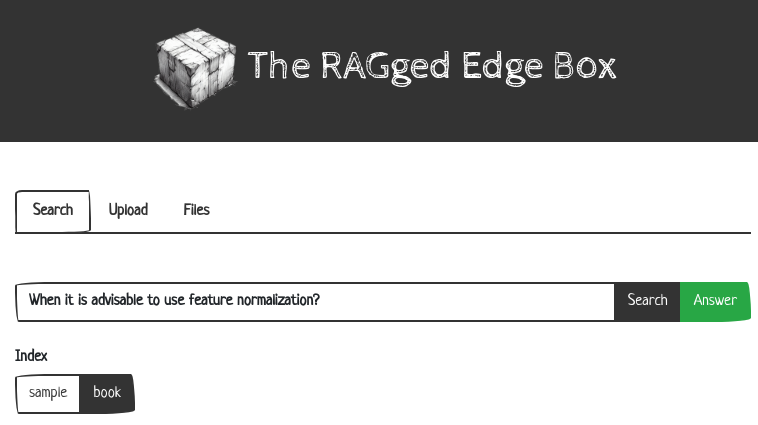
- 主页面:用于搜索、上传和浏览文档。
Main Page: For Search, Upload, and Document browsing.
- 搜索结果页面:显示您的搜索查询结果,并允许您选择文本来回答问题。
Search Results Page: Displays the results of your search queries and allows you to select passages to use for answering questions.
技术流程
该系统遵循典型的 RAG 工作流程:
- 文档摄取与索引:上传的文档被解析、分块,并转换为向量嵌入,存储在本地向量数据库中。
- 查询处理:用户的问题被同样转换为向量。
- 语义检索:系统在向量数据库中进行相似性搜索,找到与问题最相关的文档片段。
- 答案生成:检索到的相关片段与原始问题一起,被送入大型语言模型(LLM),生成最终的自然语言答案。
快速入门指南
按照以下步骤,在您的本地环境中快速部署并开始使用 RAGged Edge Box。
步骤 1:安装 VirtualBox
Visit virtualbox.org and download the latest version of VirtualBox for the operating system on your laptop. Follow the installation instructions provided on the website.
访问 virtualbox.org,根据您笔记本电脑的操作系统下载最新版本的 VirtualBox。按照网站提供的安装说明进行操作。
步骤 2:下载 RAGged Edge Box 虚拟机
Download the RAGged Edge Box Virtual Machine (VM) from our website. This VM contains the Ragged Edge system and will run within VirtualBox.
从我们的网站下载 RAGged Edge Box 虚拟机(VM)。此虚拟机包含了 Ragged Edge 系统,将在 VirtualBox 中运行。
步骤 3:启动 Ragged Edge 虚拟机
Open VirtualBox and import the RAGged Edge Box VM. Launch the VM, and it will start running on your laptop.
打开 VirtualBox 并导入 RAGged Edge Box 虚拟机。启动该虚拟机,它将在您的笔记本电脑上开始运行。
步骤 4:访问 Ragged Edge 网站
Once the VM is running, browse to the internal IP address of the VM (http://localhost:8090/) to access the Ragged Edge website. This is where you’ll interact with the system and manage your documents.
虚拟机运行后,在浏览器中访问虚拟机的内部 IP 地址(http://localhost:8090/)以进入 Ragged Edge 网站。您将在此与系统交互并管理您的文档。
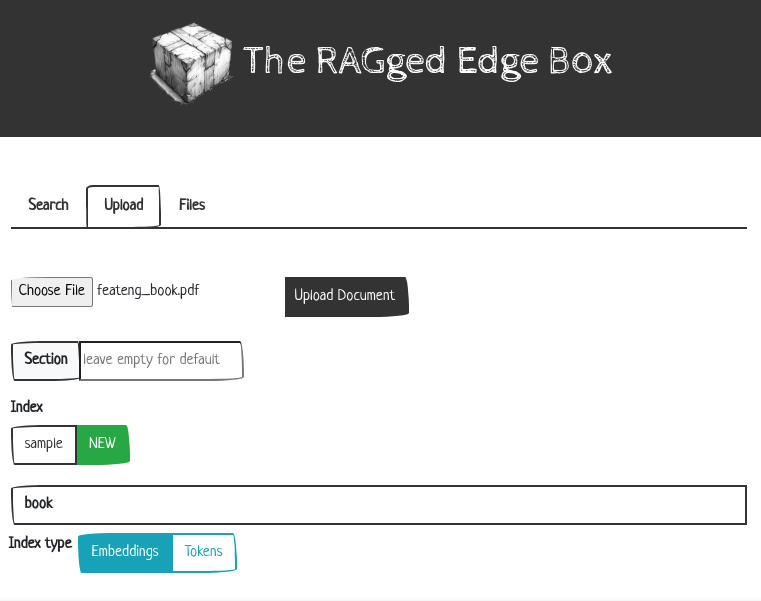
步骤 5:上传您的文档
Using the Ragged Edge Box website, upload the documents you want to index and search. The system will automatically index your files and make them available for advanced semantic search and AI-powered question-answering. It supports common formats such as PDF, Word, HTML and text files.
使用 Ragged Edge Box 网站,上传您希望建立索引并进行搜索的文档。系统将自动为您的文件建立索引,使其可用于高级语义搜索和AI驱动的问答。它支持常见格式,如 PDF、Word、HTML 和文本文件。
核心功能与技术规格
为了清晰展示 RAGged Edge Box 的能力,我们将其核心特性总结如下表:
| 功能类别 | 具体描述 | 支持格式/技术 |
|---|---|---|
| 文档支持 | 系统可解析、索引并搜索多种常见文档格式。 | PDF, DOC/DOCX, HTML, TXT |
| 搜索能力 | 基于向量相似度的语义搜索,超越关键词匹配。 | 检索增强生成 (RAG),向量数据库 |
| 部署模式 | 完全本地化部署,数据无需上传至云端。 | Docker 容器,VirtualBox 虚拟机 |
| 用户界面 | 提供基于Web的直观界面,用于文档管理和交互式问答。 | Web GUI (端口 8090) |
| 核心优势 | 隐私安全、单用户控制、开箱即用。 | — |
深入学习与资源
Checkout the source code of the project on GitHub and the slides from a recent talk on the project.
您可以在 GitHub 上查看该项目的源代码,以及近期关于该项目的演讲幻灯片。
准备好变革您的文档管理体验了吗?
Get started with RAGged Edge Box today and discover the power of AI-driven search and retrieval for your confidential documents.
立即开始使用 RAGged Edge Box,为您的机密文档探索 AI 驱动的搜索和检索的强大功能。
立即下载 RAGged Edge Box (preview3)
常见问题(FAQ)
RAGged Edge Box 如何保证我的文档隐私安全?
RAGged Edge Box 完全在您的本地笔记本电脑上运行,所有文档处理、索引和搜索都在本地完成,数据永远不会离开您的设备,确保完全保密。
安装 RAGged Edge Box 需要哪些步骤?
只需两步:1) 从 virtualbox.org 下载安装 VirtualBox;2) 从官网下载 RAGged Edge Box 虚拟机镜像,然后在 VirtualBox 中导入并启动即可。
这个系统支持哪些文档格式进行搜索?
支持 PDF、Word(DOC/DOCX)、HTML 和纯文本(TXT)等常见格式,上传后系统会自动解析、分块并建立索引供语义搜索。
版权与免责声明:本文仅用于信息分享与交流,不构成任何形式的法律、投资、医疗或其他专业建议,也不构成对任何结果的承诺或保证。
文中提及的商标、品牌、Logo、产品名称及相关图片/素材,其权利归各自合法权利人所有。本站内容可能基于公开资料整理,亦可能使用 AI 辅助生成或润色;我们尽力确保准确与合规,但不保证完整性、时效性与适用性,请读者自行甄别并以官方信息为准。
若本文内容或素材涉嫌侵权、隐私不当或存在错误,请相关权利人/当事人联系本站,我们将及时核实并采取删除、修正或下架等处理措施。 也请勿在评论或联系信息中提交身份证号、手机号、住址等个人敏感信息。