RAG-Anything 如何实现多模态文档处理?2026年安装配置指南

AI Summary (BLUF)
RAG-Anything is a lightweight RAG system based on LightRAG, designed for multimodal document processing (PDF, images, tables, formulas, etc.). It provides end-to-end parsing, multimodal understanding,
RAG-Anything: A Comprehensive Multimodal RAG System for Complex Documents
RAG-Anything 如何实现多模态文档处理?2026年安装配置指南
Introduction to RAG-Anything
RAG-Anything 是基于轻量化的 LightRAG,面向多模态文档(PDF、图片、表格、公式等)处理的 RAG 系统。该系统能够无缝处理和查询包含文本、图像、表格、公式等多模态内容的复杂文档,提供完整的 RAG 解决方案。
RAG-Anything is a RAG system built upon the lightweight LightRAG framework, designed specifically for processing multimodal documents (PDFs, images, tables, formulas, etc.). The system can seamlessly handle and query complex documents containing text, images, tables, formulas, and other multimodal content, providing a complete end-to-end RAG solution.
Use Cases
对于以下任意场景,RAG-Anything 会是一个非常好的选择。
RAG-Anything is an excellent choice for the following scenarios:
Documents with charts, tables, and formulas: Research papers, reports, PPTs requiring multimodal support.
End-to-end solutions: Users only need to input raw documents; the system automatically completes the entire process from document parsing to query response without manual intervention.
Large document volumes: Parallel processing capabilities for handling multiple documents efficiently.
Key Highlights of RAG-Anything
系统架构
System Architecture
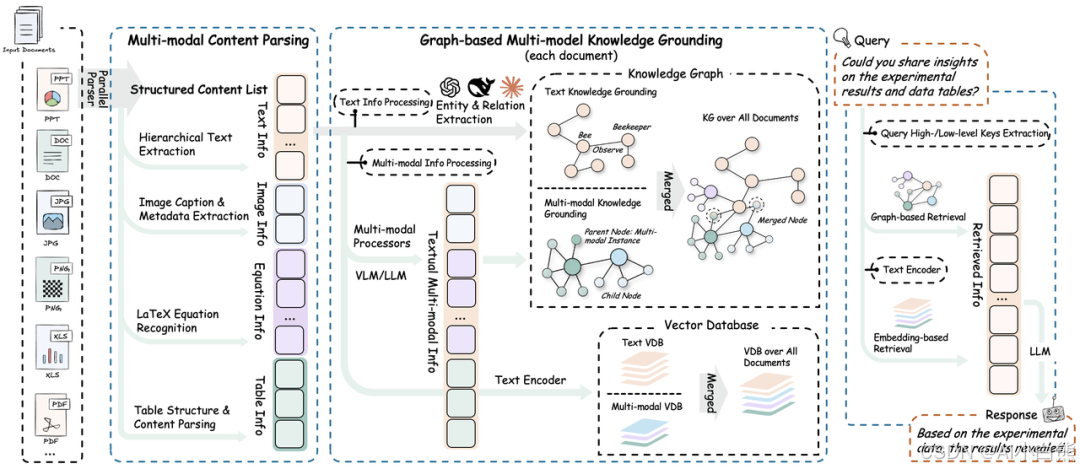
RAG-Anything 的系统架构分为以下几个阶段与功能:
The system architecture of RAG-Anything is divided into the following phases and functionalities:
1. 📄 Document Parsing Phase
通过高精度解析平台,系统实现多模态元素的完整识别与提取。
Through a high-precision parsing platform, the system achieves complete recognition and extraction of multimodal elements.
Core Function | Description |
|---|---|
Structured Extraction Engine | Integrates MinerU and Docling for document structure recognition and multimodal content extraction |
Adaptive Content Decomposition | Intelligently separates text, images, tables, and formulas while maintaining semantic associations |
Multi-format Compatibility | Supports unified parsing and output of PDF, Office documents, images, and other mainstream formats |
2. 🧠 Multimodal Content Understanding & Processing
通过自主分类路由机制和并发多流水线架构,实现内容的高效并行处理。
Through an autonomous classification routing mechanism and concurrent multi-pipeline architecture, efficient parallel processing of content is achieved.
Core Function | Description |
|---|---|
Content Classification & Routing | Sends different content types to optimized processing channels |
Concurrent Multi-pipeline | Parallel processing of text and multimodal data for efficiency and completeness |
Document Hierarchy Preservation | Maintains original document hierarchy and element relationships during transformation |
3. 🧠 Multimodal Analysis Engine
系统针对异构数据类型设计了模态感知处理单元。
The system designs modality-aware processing units for heterogeneous data types.
Core Function | Description |
|---|---|
Visual Content Analyzer | Image recognition, semantic caption generation, spatial relationship parsing |
Structured Data Interpreter | Table analysis, trend identification, multi-table semantic dependency extraction |
Mathematical Expression Parser | High-precision formula parsing with LaTeX integration |
Extensible Modality Processor | Plugin architecture supporting dynamic integration of new modality types |
4. 🔍 Multimodal Knowledge Graph Indexing
将文档内容转化为结构化语义表示,建立跨模态关系。
Converts document content into structured semantic representations and establishes cross-modal relationships.
Core Function | Description |
|---|---|
Multimodal Entity Extraction | Converts important elements into knowledge graph nodes |
Cross-modal Relationship Mapping | Establishes semantic connections between text and multimodal components |
Hierarchy Preservation | Maintains original document organizational structure |
Weighted Relationship Scoring | Optimizes retrieval through semantic and contextual weighting |
5. 🎯 Modality-Aware Retrieval
通过向量搜索与图遍历算法实现内容检索与排序。
Implements content retrieval and ranking through vector search and graph traversal algorithms.
Core Function | Description |
|---|---|
Vector-Graph Fusion | Combines semantic embeddings with structural relationships for comprehensive retrieval |
Modality-Aware Ranking | Dynamically adjusts result priority based on query type |
Relationship Consistency Maintenance | Ensures semantic and structural consistency in retrieval results |

Installation and Setup
安装 rag-anything 及其扩展
Installing RAG-Anything and its Extensions
# Clone the project from GitHub
git clone https://github.com/HKUDS/RAG-Anything.git
# Enter the project directory
cd RAG-Anything
# Create a virtual environment
python -m venv venv
# Activate the virtual environment
.\venv\Scripts\Activate.ps1
# Install basic dependencies
pip install -e .
# Install extended dependencies
pip install -e '.[all]'
验证 MinerU 安装(安装 rag-anything 时会自动安装 MinerU)
Verify MinerU Installation (Automatically installed with RAG-Anything)
mineru --version    # Check MinerU version

python -c "from raganything import RAGAnything; rag = RAGAnything(); print('✅ MinerU installation successful' if rag.check_parser_installation() else '❌ MinerU installation failed')"
Running Official Examples
下述 api-key 需要使用 OpenAI 的,可到 openai 官网获取 apikey 或参考使用教程-api 及 RAGAnything 配置自行配置 api 及模型
The following API keys require OpenAI credentials. Obtain an API key from the OpenAI website or configure your own API and model settings as per the tutorial.
# End-to-end processing
python examples/raganything_example.py path/to/document.pdf --api-key YOUR_API_KEY --parser mineru

# Direct modality processing
python examples/modalprocessors_example.py --api-key YOUR_API_KEY

# Office document parsing test (MinerU only)
python examples/office_document_test.py --file path/to/document.docx

# Image format parsing test (MinerU only)
python examples/image_format_test.py --file path/to/image.bmp

# Text format parsing test (MinerU only)
python examples/text_format_test.py --file path/to/document.md

# Check LibreOffice installation
python examples/office_document_test.py --check-libreoffice --file dummy

# Check PIL/Pillow installation
python examples/image_format_test.py --check-pillow --file dummy

# Check ReportLab installation
python examples/text_format_test.py --check-reportlab --file dummy
Usage Tutorial (Using SiliconFlow as an Example)
Import Dependencies
import asyncio
from raganything import RAGAnything, RAGAnythingConfig
from raganything.modalprocessors import ImageModalProcessor, TableModalProcessor, GenericModalProcessor
from lightrag import LightRAG
from lightrag.llm.openai import openai_complete_if_cache, openai_embed
from lightrag.utils import EmbeddingFunc
import os
API and RAGAnything Configuration
到硅基流动官网注册账号并获取 api-key
Register an account on the SiliconFlow website and obtain your API key.
硅基流动的 base-url 是固定的 https://api.siliconflow.cn/v1
The SiliconFlow base URL is fixed: https://api.siliconflow.cn/v1
async def main():
    # Set API configuration
    api_key = "your api key"  # Fill in your API key
    base_url = "https://api.siliconflow.cn/v1"  # Fill in base URL

    # Create RAGAnything configuration
    config = RAGAnythingConfig(
        working_dir="./rag_storage",
        parser="mineru",  # Choose parser: mineru or docling
        parse_method="auto",  # Parse method: auto, ocr, or txt
        enable_image_processing=True,
        enable_table_processing=True,
        enable_equation_processing=True,
    )
Define LLM Model Function
选择你想要的模型名称
Select the model name you want.
# Define LLM model function
def llm_model_func(prompt, system_prompt=None, history_messages=[], **kwargs):
    return openai_complete_if_cache(
        "THUDM/GLM-4.1V-9B-Thinking",  # Fill in model name
        prompt,
        system_prompt=system_prompt,
        history_messages=history_messages,
        api_key=api_key,
        base_url=base_url,
        **kwargs,
    )
Define Vision Model Function
按照类型:对话,标签:视觉筛选,选择你想要的视觉模型
Filter by type: Dialogue, Tag: Vision, and select your desired vision model.
# Define vision model function for image processing
def vision_model_func(
    prompt, system_prompt=None, history_messages=[], image_data=None, messages=None, **kwargs
):
    # If messages format is provided (for multimodal VLM enhanced queries), use directly
    if messages:
        return openai_complete_if_cache(
            "THUDM/GLM-4.1V-9B-Thinking",  # Fill in model name
            "",
            system_prompt=None,
            history_messages=[],
            messages=messages,
            api_key=api_key,
            base_url=base_url,
            **kwargs,
        )
    # Traditional single image format
    elif image_data:
        return openai_complete_if_cache(
            "THUDM/GLM-4.1V-9B-Thinking",  # Fill in model name
            "",
            system_prompt=None,
            history_messages=[],
            messages=[
                {"role": "system", "content": system_prompt}
                if system_prompt
                else None,
                {
                    "role": "user",
                    "content": [
                        {"type": "text", "text": prompt},
                        {
                            "type": "image_url",
                            "image_url": {
                                "url": f"data:image/jpeg;base64,{image_data}"
                            },
                        },
                    ],
                }
                if image_data
                else {"role": "user", "content": prompt},
            ],
            api_key=api_key,
            base_url=base_url,
            **kwargs,
        )
    # Pure text format
    else:
        return llm_model_func(prompt, system_prompt, history_messages, **kwargs)
Define Embedding Model Function
按照类型:嵌入筛选,选择你想要的模型,填写模型维度
Filter by type: Embedding, select your desired model, and fill in the model dimension.
# Define embedding function
embedding_func = EmbeddingFunc(
    embedding_dim=1024,  # Fill in model dimension
    max_token_size=512,  # Fill in model max token length
    func=lambda texts: openai_embed(
        texts,
        model="BAAI/bge-m3",  # Fill in embedding model name
        api_key=api_key,
        base_url=base_url,
    ),
)
Initialize RAGAnything
# Initialize RAGAnything
rag = RAGAnything(
    config=config,
    llm_model_func=llm_model_func,  # LLM model function defined above
    vision_model_func=vision_model_func,  # Vision model function defined above
    embedding_func=embedding_func,  # Embedding model function defined above
)
Document Processing
Process a single document
# Process document
await rag.process_document_complete(
    file_path=r"path\to\your\file.pdf",  # Fill in file path to process
    output_dir="./output",  # Output directory
    parse_method="auto"
)
Process multiple documents
# Process multiple documents
await rag.process_folder_complete(
    folder_path="./documents",  # Create a documents folder in the project and place files there
    output_dir="./output",
    file_extensions=[".pdf", ".docx", ".pptx"],  # Fill in file types to process
    recursive=True,  # Whether to recursively process subfolders
    max_workers=4  # Number of threads to use
)
Querying from RAG-Anything
Pure Text Query
# 1. Pure text query - basic knowledge base search
text_result = await rag.aquery(
    "What is the main content of the document?",  # Fill in query content
    mode="hybrid"  # Choose query mode: hybrid, local, global, or naive
)
print("Text query result:", text_result)
VLM-Enhanced Query
# 2. VLM-enhanced query (automatically enabled when vision_model_func is provided during initialization)
vlm_result = await rag.aquery(
    "Analyze the charts and data in the document",  # Fill in query content
    mode="hybrid"
    # vlm_enhanced=True  # Optionally force enable/disable
)
print("VLM query result:", vlm_result)
Multimodal Query
# 3. Multimodal query - queries containing specific multimodal content
# 3.1 Query with table data
multimodal_result = await rag.aquery_with_multimodal(
    "Analyze this cart recovery strategy table and explain the recovery methods for different product types in context of the document",
    multimodal_content=[{
        "type": "table",
        "table_data": """Product Type,Recovery Method,Expected Effect
                        Clothing,Personalized Recommendations + Limited Discount,30% Conversion Rate Increase
                        Electronics,Price Comparison + Extended Warranty
                        Home Goods,Combo Recommendations + Free Shipping
                        Beauty & Skincare,Sample Giveaway + Membership Points""",
        "table_caption": "Cart Recovery Strategy Comparison Table"
    }],
    mode="hybrid"
)
print("Multimodal table query result:", multimodal_result)

# 3.2 Query with formula content
equation_result = await rag.aquery_with_multimodal(
    "Explain this formula and its relevance to the document content",
    multimodal_content=[{
        "type": "equation",
        "latex": "P(d|q) = \\frac{P(q|d) \\cdot P(d)}{P(q)}",
        "equation_content": "Document Relevance Probability"
    }],
    mode="hybrid"
)
print("Multimodal equation query result:", equation_result)
Loading an Existing LightRAG Instance (Optional)
Check if storage directory exists
# Define LightRAG instance directory
lightrag_working_dir = "./existing_lightrag_storage"

# Check if a previous LightRAG instance exists; load if so, otherwise create a new one
if os.path.exists(lightrag_working_dir) and os.listdir(lightrag_working_dir):
    print("✅ Existing LightRAG instance found, loading...")
else:
    print("❌ No existing LightRAG instance found, creating new instance")
Create or load LightRAG instance
# Create/load LightRAG instance with your configuration
lightrag_instance = LightRAG(
    working_dir=lightrag_working_dir,
    llm_model_func=lambda prompt, system_prompt=None, history_messages=[], **kwargs: openai_complete_if_cache(
        "THUDM/GLM-4.1V-9B-Thinking",
        prompt,
        system_prompt=system_prompt,
        history_messages=history_messages,
        api_key=api_key,
        base_url=base_url,
        **kwargs,
    ),
    embedding_func=EmbeddingFunc(
        embedding_dim=1024,
        max_token_size=512,
        func=lambda texts: openai_embed(
            texts,
            model="BAAI/bge-m3",
            api_key=api_key,
            base_url=base_url,
        ),
    )
)
Initialize storage
# Initialize storage (loads existing data if present)
await lightrag_instance.initialize_storages()
await initialize_pipeline_status()
Initialize RAGAnything with existing LightRAG instance
# Initialize RAGAnything with existing LightRAG instance
rag = RAGAnything(
    lightrag=lightrag_instance,  # Pass existing LightRAG instance
    vision_model_func=vision_model_func,
    # Note: working_dir, llm_model_func, embedding_func are inherited from lightrag_instance
)
Adding New Documents to Existing Instance
# Add new multimodal documents to existing LightRAG instance
await rag.process_document_complete(
    file_path="path/to/new/multimodal_document.pdf",
    output_dir="./output"
)
Direct Content List Insertion (Optional)
已经有预解析的内容列表(例如,来自外部解析器或之前的处理结果)时,可以直接插入到 RAGAnything 中而无需文档解析
When you already have pre-parsed content lists (e.g., from external parsers or previous processing results), you can insert them directly into RAGAnything without document parsing.
Prepare content list
# Example: pre-parsed content list from external source
content_list = [
    {
        "type": "text",
        "text": "This is the introduction section of our research paper.",
        "page_idx": 0
    },
    {
        "type": "image",
        "img_path": r"C:\absolute\path\to\figure1.jpg",  # Important: use absolute path
        "img_caption": ["Figure 1: System Architecture"],
        "img_footnote": ["Source: Original design by authors"],
        "page_idx": 1
    },
    {
        "type": "table",
        "table_body": "| Method | Accuracy | F1 Score |\n|--------|----------|----------|\n| Our Method | 95.2% | 0.94 |\n| Baseline | 87.3% | 0.85 |",
        "table_caption": ["Table 1: Performance Comparison"],
        "table_footnote": ["Test dataset results"],
        "page_idx": 2
    },
    {
        "type": "equation",
        "latex": "P(d|q) = \\frac{P(q|d) \\cdot P(d)}{P(q)}",
        "text": "Document Relevance Probability Formula",
        "page_idx": 3
    }
]
Insert content list
# Insert content list
await rag.insert_content_list(
    content_list=content_list,
    file_path="research_paper.pdf",  # Reference filename for citation
    doc_id=None,  # Optional custom document ID (auto-generated if not provided)
)
Conclusion
RAG-Anything 为处理复杂多模态文档提供了一个强大且完整的解决方案,从文档解析到智能查询,覆盖了 RAG 系统的全流程。
RAG-Anything provides a powerful and complete solution for processing complex multimodal documents, covering the entire RAG pipeline from document parsing to intelligent querying. Its modular architecture, support for multiple parsers (MinerU, Docling), and modality-aware processing make it an excellent choice for researchers, developers, and enterprises dealing with diverse document formats and content types.
常见问题(FAQ)
RAG-Anything 支持哪些文档格式?
RAG-Anything 支持 PDF、Office 文档、图片等主流格式,能够统一解析并提取文本、图像、表格、公式等多模态内容。
RAG-Anything 如何实现多模态检索?
系统通过多模态知识图谱索引,将文本、图像、表格等元素转化为节点并建立跨模态关系,再结合模态感知检索技术,实现精准的多模态查询。
RAG-Anything 适合处理什么类型的文档?
适合包含图表、表格、公式的复杂文档,如研究论文、报告、PPT,尤其需要端到端多模态支持和大批量文档并行处理的场景。
版权与免责声明:本文仅用于信息分享与交流,不构成任何形式的法律、投资、医疗或其他专业建议,也不构成对任何结果的承诺或保证。
文中提及的商标、品牌、Logo、产品名称及相关图片/素材,其权利归各自合法权利人所有。本站内容可能基于公开资料整理,亦可能使用 AI 辅助生成或润色;我们尽力确保准确与合规,但不保证完整性、时效性与适用性,请读者自行甄别并以官方信息为准。
若本文内容或素材涉嫌侵权、隐私不当或存在错误,请相关权利人/当事人联系本站,我们将及时核实并采取删除、修正或下架等处理措施。 也请勿在评论或联系信息中提交身份证号、手机号、住址等个人敏感信息。